Mode Choice Modeling with R

June 14th, 2013

I started this post (and the work to go with it) as a companion to A Self Instructing Course in Mode Choice Modeling by Bhat and Koppelman.  That's because I could reproduce the work in the book in R and can (now) reproduce in R.

To continue with this, please get the CD files from my last blog post.  You'll specifically need "SF MTC Work MC Data.sav", which is in SPSS format.

The first part:

library(foreign)
library(mlogit)

The items above simply load the libraries.  If any of these are not found, go to Packages (on the menu bar) - Install Packages... and select your closest mirror and select the missing package (either foreign or mlogit).

Next, read in the data and we'll add a field, too, as there is no unique id in this dataset.

inTab<-read.spss(file.choose(),to.data.frame=T,use.value.labels=F)
inTab$HHPerID=inTab$hhid*100+inTab$perid

The first line reads in the SPSS file (it asks you for the file).  The second adds a "HHPerID" field, which is unique to each case.

The next part is to format the data for mlogit.  This is quite a challenge because it has to be JUST RIGHT or there will be errors.

mc<-mlogit.data(inTab,choice="chosen",shape="long",chid.var="HHPerID",alt.var="altnum",drop.index=T)

The first parts of this are pretty obvious (inTab is the input table, choice="chosen" is the choice field).  Shape="long" indicates that the data is multiple records per case.  "Wide" would indicate each record is on its own line.  chid.var is the case id variable.  alt.var is the alternatives.  drop.index drops the index field out of the resulting table.

Finally, we'll run a simple multinomial logit estimate on this.

nlb<-mlogit(chosen~cost+tvtt|hhinc,mc)

For such a short piece of code, there is a lot going on here.  The formula is (simply) chosen=cost+tvtt+hhinc, BUT hhinc is alternative specific and cost and travel time are not.  So the utilities for this would be something like:

U_{da}=\beta_{cost}*cost+\beta_{tt}*tvtt

U_{sr2}=\beta_{cost}*cost+\beta_{tt}*tvtt+\beta_{inc,sr2}*hhinc+K_{sr2}

U_{sr3}=\beta_{cost}*cost+\beta_{tt}*tvtt+\beta_{inc,sr3}*hhinc+K_{sr3}

U_{transit}=\beta_{cost}*cost+\beta_{tt}*tvtt+\beta_{inc,tranist}*hhinc+K_{transit}

U_{walk}=\beta_{cost}*cost+\beta_{tt}*tvtt+\beta_{inc,walk}*hhinc+K_{walk}

U_{bike}=\beta_{cost}*cost+\beta_{tt}*tvtt+\beta_{inc,bike}*hhinc+K_{bike}


The result is this:

>summary(nlb)

Call:
mlogit(formula = chosen ~ cost + tvtt | hhinc, data = mc, method = "nr",
print.level = 0)

Frequencies of alternatives:
1 2 3 4 5 6
0.7232054 0.1028037 0.0320143 0.0990257 0.0099423 0.0330086

nr method
6 iterations, 0h:0m:6s
g'(-H)^-1g = 5.25E-05
successive function values within tolerance limits

Coefficients :
Estimate Std. Error t-value Pr(>|t|)
2:(intercept) -2.17804077 0.10463797 -20.8150 < 2.2e-16 ***
3:(intercept) -3.72512379 0.17769193 -20.9639 < 2.2e-16 ***
4:(intercept) -0.67094862 0.13259058 -5.0603 4.186e-07 ***
5:(intercept) -2.37634141 0.30450385 -7.8040 5.995e-15 ***
6:(intercept) -0.20681660 0.19410013 -1.0655 0.286643
cost -0.00492042 0.00023890 -20.5965 < 2.2e-16 ***
tvtt -0.05134065 0.00309940 -16.5647 < 2.2e-16 ***
2:hhinc -0.00216998 0.00155329 -1.3970 0.162406
3:hhinc 0.00035756 0.00253773 0.1409 0.887952
4:hhinc -0.00528636 0.00182881 -2.8906 0.003845 **
5:hhinc -0.01280827 0.00532413 -2.4057 0.016141 *
6:hhinc -0.00968627 0.00303306 -3.1936 0.001405 **
---
Signif. codes: 0 ‘***’ 0.001 ‘**’ 0.01 ‘*’ 0.05 ‘.’ 0.1 ‘ ’ 1

Log-Likelihood: -3626.2
McFadden R^2: 0.25344
Likelihood ratio test : chisq = 2462 (p.value = < 2.22e-16)

And this matches the self-instructing course manual, page 76 (under "Base Model").

Nested Logit

R can do simple nested logit calculations, but unfortunately they have to be *very* simple (which is uncharacteristic for R).  The best thing to do is get a copy of Biogeme and read the next post in this series.

Linear and Nonlinear Models in R

June 7th, 2013

This post will talk about building linear and non-linear models of trip rates in R.  If you haven't read the first part of this series, please do so, partly because this builds on it.

Simple Linear Models

Simple linear models are, well, simple in R.  An example of a fairly easy linear model with two factors is:

inTab.hbsh<-subset(inTab,TP_Text=='HBSh')
hbsh<-ddply(inTab.hbsh,.(HHID,HHSize6,Workers4,HomeAT),summarise,N=length(HHID))
hbsh.lm.W_H<-lm(N~Workers4+HHSize6,data=hbsh)

This creates a simple linear home-based-shopping trip generation model based on workers and household size.  Once the estimation completes (it should take less than a second), the summary should show the following data:

> summary(hbsh.lm.W_H)

Call:
lm(formula = N ~ Workers4 + HHSize6, data = hbsh)

Residuals:
    Min      1Q  Median      3Q     Max 
-2.2434 -1.1896 -0.2749  0.7251 11.2946 

Coefficients:
            Estimate Std. Error t value Pr(&gt;|t|)    
(Intercept)  1.79064    0.10409  17.203  < 2e-16 ***
Workers4    -0.02690    0.05848  -0.460    0.646    
HHSize6      0.24213    0.04365   5.547 3.58e-08 ***
---
Signif. codes:  0 ‘***’ 0.001 ‘**’ 0.01 ‘*’ 0.05 ‘.’ 0.1 ‘ ’ 1 

Residual standard error: 1.649 on 1196 degrees of freedom
Multiple R-squared: 0.03228,    Adjusted R-squared: 0.03066 
F-statistic: 19.95 on 2 and 1196 DF,  p-value: 3.008e-09

What all this means is:

Trips = -0.0269*workers+0.24213*HHSize+1.79064

The important things to note on this is that the intercept is very significant (that's bad) and the R2 is 0.03066 (that's horrible).  There's more here, but it's more details.

Non-Linear Least Squares

When doing a non-linear model, the nls function is the way to go.  The two lines below create a trips data frame, and then run a non-linear least-squares model estimation on it (note that the first line is long and wraps to the second line).

trips<-ddply(inTab,.(HHID,HHSize6,Workers4,HHVEH4,INCOME,WealthClass),AreaType=min(HomeAT,3),summarise,T.HBSH=min(sum(TP_Text=='HBSh'),6),T.HBSC=sum(TP_Text=='HBS'),T.HBSR=sum(TP_Text=='HBSoc'),T.HBO=sum(TP_Text=='HBO'))
trips.hbo.nls.at3p<-nls(T.HBO~a*log(HHSize6+b),data=subset(trips,AreaType>=3),start=c(a=1,b=1),trace=true)

The second line does the actual non-linear least-squares estimation.  The input formula is T=a*e^(HHSize+b).  In this type of model, starting values for a and b have to be given to the model.

The summary of this model is a little different:

> summary( trips.hbo.nls.at3p)

Formula: T.HBO ~ a * log(HHSize6 + b)

Parameters:
  Estimate Std. Error t value Pr(>|t|)    
a   1.8672     0.1692  11.034  < 2e-16 ***
b   1.2366     0.2905   4.257 2.58e-05 ***
---
Signif. codes:  0 ‘***’ 0.001 ‘**’ 0.01 ‘*’ 0.05 ‘.’ 0.1 ‘ ’ 1 

Residual standard error: 2.095 on 402 degrees of freedom

Number of iterations to convergence: 4 
Achieved convergence tolerance: 1.476e-07 

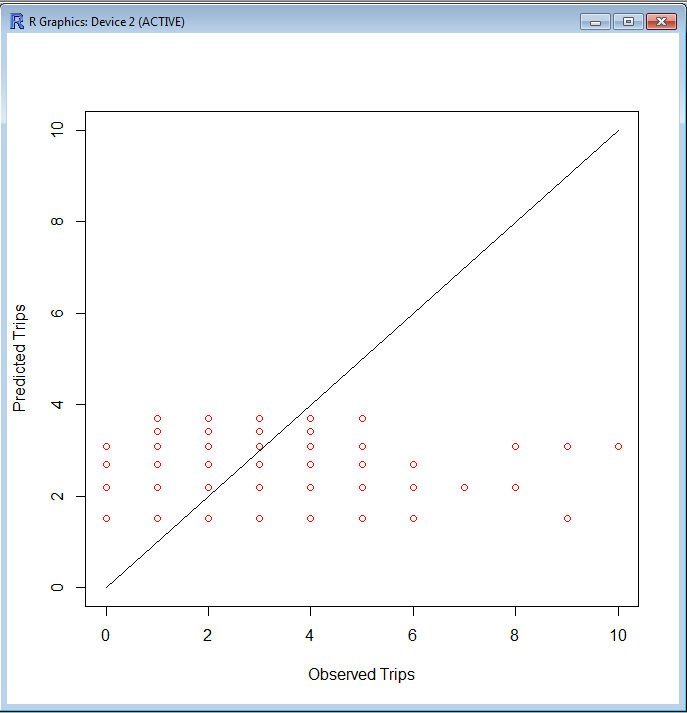
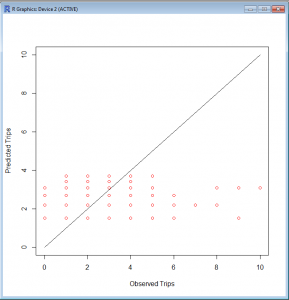
It doesn't perform R2 on this because it can't directly. However, we can because we know the actual values and the model predicts the values. So, one thing that can be done is a plot:

> plot(c(0,10),c(0,10),type='l',xlab='Observed Trips',ylab='Predicted Trips')
> points(subset(trips,AreaType>=3)$T.HBO,fitted(trips.hbo.nls.at3p),col='red')

The resulting graph looks like this. Not particularly good, but there is also no scale as to the frequency along the 45° line.
rgraph
R2 is still a good measure here. There's probably an easier way to do this, but this way is pretty simple.

testTable<-data.frame(cbind(subset(trips,AreaType>=3)$T.HBO,fitted(trips.hbo.nls.at3p)))
cor(testTable$X1,testTable$X2)

Since I didn't correct the column names when I created the data frame, R used X1 and X2, as evidenced by checking the summary of testTable:

> summary(testTable)
       X1               X2       
 Min.   : 0.000   Min.   :1.503  
 1st Qu.: 1.000   1st Qu.:1.503  
 Median : 2.000   Median :2.193  
 Mean   : 2.072   Mean   :2.070  
 3rd Qu.: 3.000   3rd Qu.:2.193  
 Max.   :23.000   Max.   :3.696  

So the R2 value is pretty bad...

> cor(testTable$X1,testTable$X2)
[1] 0.2755101

It's better than some of the others, after all, this is semirandom human behavior.
That's it for now. My next post will be... MORE R!
Also, I have a quick shout-out to Jeremy Raw at FHWA for help via email related to this. He helped me through some issues via email, and parts of his email helped parts of this post.
New Project In the Works

May 31st, 2013

I haven't worked in R in several days because I've been working on a new project that will assist with getting good transit speed curves from highway data.  The project is in Java and is on my Github page.

I'm working on making part of it multi-threaded, which is new to me.

A second project that is still in my mind (and I'm not sure if this will become part of this one or another separate project) will be to use transit GPS traces to get good trip length frequencies on transit.

Stay tuned!

Getting Started in R

May 24th, 2013

Setting Up

Download R from http://www.r-project.org. Install it normally (on Windows)... Double-click, next, next, next, etc.

Create a project folder with your data and with a shortcut to R (shout-out to Brian Gregor at Oregon DOT for this little trick). Also copy/move the data CSV there.

Inputting and Looking at Data

The data is in CSV, so we need to load the foreign library, and then we'll load the data. I'm not a fan of typing in long filepaths, so I use the file.choose() function to browse for the data. Note that in many cases the

inTab&lt;-read.csv(file.choose())
summary(inTab)

In the code above, we've loaded the dbf into the inTab data frame (a data object in R) and got a summary of it. There's a few tricks to see parts of the data.

inTab$HHID (only the HHID values)
inTab[1:2] (only the first two fields)
inTab[1:10,] (only the first 10 rows)
inTab[1:10,1] (only the first field of the first 10 rows)

Data can be charted in R as well. A simple histogram is very simple to do in R.

hist(inTab$HHSize)

Sometimes data needs to be summarized. There is a function to do that, but first you'll probably have to download a package. To download the module, go to Packages - Install Packages. From the list, find plyr and install it.

Once plyr is installed (it shouldn't take long), you can load the module and use ddply to summarize data.

library(plyr)
inTab.Per&lt;-ddply(inTab,.(HHID,HHSize6,Workers4,HHVEH4,INCOME,WealthClass),AreaType=min(HomeAT,3),summarise,T.HBSH=min(sum(TP_Text=='HBSh'),6),T.HBSC=sum(TP_Text=='HBS'),T.HBSR=sum(TP_Text=='HBSoc'),T.HBO=sum(TP_Text=='HBO'))

Where inTab is the input table, .(HHID,HHSize6,HHVEH4,INCOME,WealthClass) are input fields to summarize by, AreaType=min(HomeAT,3) is a calculated field to summarize by, and everything following 'summarise' are the summaries.

Conclusion

This is a crash course in R, and in the last steps, you basically computed average trip rates.  Next week's post will be to run linear and non-linear models on this data.

A Self Instructing Course in Mode Choice Modeling

May 20th, 2013

One thing to ensure you understand how your software of choice works is to compare it to known outcomes.  For example, while learning Biogeme, I converted and ran some of the scenarios in A Self Instructing Course in Mode Choice Modeling in Biogeme and found interesting issues where certain values coming out of Biogeme were the reciprocal of those in the manual.  Neither is wrong, but when applying the data to a model, you have to know these things.

I've decided to do the same thing in R, and I had a lot of problems getting the CD.  I luckily found one on my hard drive.  It is here.

For the sake of making life easier on anyone that gets here looking for the manual, it's here.

New Series on R in Transportation Modeling [Updated 21 May 2013]

May 17th, 2013

I've been doing a lot of statistical stuff over the past several weeks, and I think it is worth some value to the Interwebs if I try and post some of it.  I'm considering making it a course of some sort with some scrubbed HHTS data (no, I can't post real peoples' locations and names, I think I might get in a little bit of trouble for that).

The "syllabus" is roughly something like this (last update: 21 May 2013):

  1. Intro to R: getting data in, making summaries
  2. Trip rates - Averages
  3. Trip rates - Linear and Non-linear modeling
  4. Mode Choice Estimation in R
  5. Complex Mode Choice Estimation in Biogeme
  6. Distribution Friction Factors
  7. Distribution K Factors
  8. Outputs and Graphics

I can't guarantee that these will be the next eight weeks worth of posts - there will probably be some weeks with a different post, since I don't know if I can get all this stuff done in six weeks, even with the head start I have.

In other news...

I've been disabling comments on these short posts that really don't warrant any sort of responses.  I've been getting a lot of spam on this blog, so I'm cutting it down where I can.  This is not a global thing, I've been turning them off on certain posts, but the default is on.

T-Test Trivia

May 13th, 2013

Any statistical test that uses the t-distribution can be called a t-test. One of the most common is Student's t-test, named after "Student," the pseudonym that William Gosset used to hide his employment by the Guinness brewery in the early 1900s.  They didn't want their competitors to know that they were making better beer with statistics.

From The Handbook of Biological Statistics.

TRB Applications Conference Mobile Website

May 3rd, 2013

For those going to the TRB Transportation Planning Applications Conference in Columbus, Ohio next week (May 5-9), I've released a very simple mobile website for it.  I have part of an API designed into the site, and I intend to continue that with the next Applications Conference, as I want to see a mobile/tablet app happen.  I can make some Android platform stuff happen, but I have no iPhone development experience nor do I have an iDevice to do that on.

In addition, I'd love to see people that tweet during the conference to use the hashtag #TRBAppCon.  I will be tweeting (sometimes) and taking some pictures during the conference.  My twitter handle is @okiAndrew.

 Next up...

The day I'm writing this (I generally schedule posts anywhere from a day to 2 weeks in advance), I read the sad news that Astrid was acquired by Yahoo!.  I'm no fan of Yahoo!, in fact, I'm quite shocked they're still in business.  I see this as the end of Astrid, so my next post will likely be about my solution to this problem.

Web Hosting and Stuff I Don't Want To Deal With

April 26th, 2013

This was originally written over at my other blog, but it deals with both sites, so I figured I'd put it over here.  This is literally a direct copy-paste, so the part about "people on Twitter know" refer to people that follow me on one of my other Twitter accounts, @KE8P.

--

Those on Twitter already know that I’ve been tasked with managing the club email list because I am the secretary of the Milford Amateur Radio Club.  I asked on Twitter if anyone had any hints and I mostly got sympathy.

So I looked for something, and stumbled upon CiviCRM that looks like it may help.  CiviCRM is an open-source Customer Relations Management system that looks pretty cool.

The problem is, it requires MySQL 5.1.  That’s not a problem FOR THEM.  It’s a problem FOR ME.  I use GoDaddy shared hosting, and they have resisted every MySQL upgrade since 5.0.  So I looked at GoDaddy’s forum, and found a cornucopia of people demanding it, all met with the same response of “we have no plans to upgrade that on the shared hosting plans, but buy a Virtual Private Server (VPS) or Dedicated Server.  Now, I pay about $100 per year for “Ultimate Shared Hosting”.  A dedicated server is $100 PER MONTH.  A VPS is $30 (ish) per month.

Mind you, the shared hosting works perfectly for me, as it’s cheap (I make no money from my websites, neither directly nor indirectly.  I don’t have the money to go to a dedicated server, nor do I have the money to go with a VPS, and if I did, I wouldn’t because I don’t want the added workload of administering a server.  I used to do that, and I got away from it because I wanted to spend time on content rather than computer administration duties.

So here I sit.  Via Twitter, I’ve received recommendations for BlueHost, DreamHost, Linode, and WestHost (and had a nice twitter conversation with an account manager from WestHost).  I haven’t made up my mind, and my hosting contract with GoDaddy is up in June.  I’ve enjoyed great up-time and service from GoDaddy in the past, but running several versions behind on the backend database is not only an annoyance (for not being able to use CiviCRM), but it is absolutely frightening to think that I may have other peoples’ emails in a database on a server that isn’t being kept up-to-date with security patches.

GoDaddy, you have a week to meet my requirements.  Upgrade to the latest MySQL.  Else, Daddy, you’ll Go.  Moving is a pain, but I will do what I have to do.  And that is NOT a promise.  I may decide to leave anyway because

-73-

--

So anyway, by the time you've read this, it is on a different server.  I've moved the sites over and double-checked everything.  Email is working, CiviCRM is working (except the parts I haven't setup), and if you read this, the site is working!

Quick Notes for the Week

April 19th, 2013

I didn't have anything big to write on this blog this week, but there's a few things out there worth a look.

In my other life, I'm an amateur radio operator.  I wrote a piece over on my other blog about the global economy and parts, as I have been buying parts from eBay at dirt-cheap prices.   This has continued implications on freight in this country.  It's likely to get worse, as the makers-turned-entrepreneurs are (in droves) sending things off to China for fabrication.  Designed in the USA, made in China.

Mike Spack over on his blog mentioned that the one feature every traffic counter must have is identification.  He's 100% correct.  I've seen a video of the Boston bomb squad blasting a traffic counter with a water cannon many years ago, and that's what happens when you don't put some sort of ID on your counters.   The orginal video of the counter's demise has long since disappeared from the Internet, but you can still see the reference on Boing Boing.


Prepping my Computer (for a conference, but that part doesn’t matter)

April 12th, 2013

Note: I thought I posted this last January, but it appears I didn't. 

This post could be re-titled "Why I Love Linux" because it requires Linux.

Like many other transportation geeks, I'm getting ready to go to this little conference in Washington, DC.  I've been getting things together because I found out a few years ago that being stuck in DC with problematic technology (like a bad cell phone battery) is no fun.  And to top it all off, my laptop feels like it has a failing hard drive.

So I booted into Ubuntu and used Disk Utility to check the SMART status via disk utility.  Which claims everything is fine.

Still, though, I didn't receive any disk with my laptop (it instead has a rescue partition) and my intuition disagrees with what my disk drive thinks of itself, so I decided the smart thing to do would be to arm myself with a few good USB flash drives.

The first USB flash drive is a live image of Ubuntu.

The second is my rescue partition image that can be restored to a new drive.  I got this by:

1. Getting an image file using the ntfsclone command:

sudo ntfsclone -o rescue.img /dev/sda4

Where /dev/sda4 is the Lenovo rescue partition (as indicated in Disk Utility)

2. Compress the rescue image

gzip rescue.img

3. Split the image into 1 GB bits

split -b 1024m rescue.img.gz

(note: steps 2 and 3 can be combined with gzip rescue.img |split -b 1024m

I then copied these to a USB flash drive.


New Open Data StackExchange Site Proposed

April 11th, 2013

Stack Exchange Q&A site proposal: Open Data

All the cool kids are opening up data.

11 Guidelines of Doing Good Semi-Academic Presentations

April 5th, 2013

I'm writing this as I'm working on a presentation for the TRB Applications Conference.  I'm working on a presentation I can present, and my delusions of grandeur are such that I THINK I can present Open Source Tools to QC Transit Survey Data as well as Steve Jobs could present a new iPhone, but without the reality distortion field.

I've been to quite a few conferences of varying groups, and I would call these "semi-academic".  Sometimes they are presenting research, but in many cases they are presenting an application of research.  There's no selling, and the audience is generally captive.

1. The Presentation is to show your work and get attendees interested in reading your paper

In places where you aren't required to post a paper, do so anyway.  Include the detail there.  Don't include tables full of numbers in a presentation, highlight one or two important numbers (trends, alternative analyses, etc) and note conclusions.  Include the big tables in the paper.

If you don't include a paper, upload a second presentation with more detail and/or use copious "slide notes".  Seriously.

The last resort - go to WordPress.com or Blogger.com or something, build a blog, and post it there.  Or hang it on your agency's website.  Or something else along those lines.

2. Don't Include tables full of numbers

Even though I mention it above, it bears repeating.  Normally, we can't read them in the audience.  Focus on one number.  For example, if you're showing that a mode choice model works better when using transfers as part of the transit utility, show us the log-likelihood or/and the correlation coefficient for ONLY the best case without transfers and the best case with transfers.  Keep it simple.  If I want the standard error of individual values, I'll look for them, and if I ask at the end of the presentation, direct me to the paper.

3. Just because you can read it on screen while authoring a presentation does not mean that your audience can read it on the projector

24 point font is a minimum.  Yes, I know PowerPoint's list box goes down to 8.  That does not mean you should ever go down there.  Some people have sight problems, and those problems can be exacerbated by trying to see around peoples' heads.

A second part of this has to do with being able to read the slides while you're presentting.  Just because you can read your slides on your 19"+ monitors at the office when you're 18" away does NOT mean that you'll e able to read them on a laptop with a 14" or 15" screen (or 17" widescreen, which is about as small due to the scaling) from a few feet away.

4. Use pictures and talk about them

If your presentation has no pictures, you're doing it wrong.  If you want your concept/idea/solution/innovation/etc (pick one), throw in a few pictures that illustrate a point (or something like that).  For example, in a presentation I'm working on now, I have a workplace location that is noted by Dilbert's office building and him waving.  I think it gets the idea of "workplace" across to people, and most people know Dilbert.

More importantly, half my presentation is maps that I will talk about.  No text.  I have 7 slides with bullets, 2 or 3 with numbered lists, and that's out of 30.  That's about right.

5. Reduce, but do not remove bullets

There is a big push in many circles to remove bullets from presentations.  In an academic presentation, that's damn near impossible.  Don't give in to the hate, but try to reduce bullets as much as practical.

6. Expect there to be dissenting opinions

I've seen a fair number of people get "blasted" by industry professionals.  Don't get mad about it.  They are normally not there to make you feel bad, and don't feel bad about it.  A session moderator can recognize when someone is asking a real question as opposed to someone that has an ax to grind, and a moderator WILL step in if someone asking questions is out of line.

7. Do not use the Microsoft PowerPoint (etc.) templates

Rare is it that a Built-in Template works for a presentation.  Normally an agency or company has some nicer and more appropriate templates to use.  Use them.

This guideline does not apply if your presentation is short (e.g. 5 minutes) or it is a presentation in a non-professional setting (e.g. a hobby).

8. Do not read your slides

I can read quite well and so can the rest of the audience.  If you're just going to read the slides, hand out your presentation (as good 'ol tree-killin' paper) and sit back down.  Don't load your presentation on the laptop, don't talk, and tell the session moderator to just skip you.

This is probably the biggest reason many people want to remove bullets.  No bullets means that you might have to (gasp!) TALK ABOUT your content!

9. Use Animations Sparingly

Do NOT use animations to simply put bullets on the screen.  However, there are times when animations are important for the point of illustrating an idea, showing a process, or just pure entertainment.

10. Do NOT use numbers for alternatives

I will forget about the numbers as soon as you change slides.  Give them names.  And for those that have used "Alternative 1" and "Alternative 1A", there is a special place in Hell for you.

11. Have the similar delusions of grandeur to what I have

Find a person you think is a damn good presenter. Learn from them.  Try to present as effectively as they do.

---

While I can't say that following these tips will make you the next great presenter, I CAN say that following these tips will help you NOT be part of the conversation that includes "THAT presentations was ATROCIOUS"  and hopefully get you more towards "THAT presentation was AWESOME!"

New Open Source ArcMap Tool Posted: Point Location Fixer

March 29th, 2013

I stumbled on a problem that seems to have no easy answer.  Working on the count stations layer here at the office, I found that we had a small number of points that weren't located in the GIS feature class, although we DO have X and Y coordinates for them.

Since searching on Google turned up nothing, I wrote my own solution.  Since I already had some Java code to look for selected features and get to the actual features, I copied that code into a new project and made a few modifications.  Those modifications are posted on Github.  Even better, I actually used a few comments in this one! :-)

Taking CSV Exported Cube Voyager Path Files to A New Level Using GAWK (part 1)

January 30th, 2013

In a prior post, I link to some code that outputs a path file.  I've done something a tad different because I needed some select link analysis and reading the path file in Cube was taking far too long to do it the normal way.

So, I took that program on Github and extended it to perform a selected link:

And this outputs a few GB of paths in CSV format.  I went from 42 GB of paths in the AM to 3.4 GB of CSV paths.  Still not good enough. The next thing I did was use GAWK to get just the Origin and Destination

This returns a CSV file of just the origin and destination (which can be linked to the vehicle trip matrix).

Part 2 will discuss how to link to a vehicle trip matrix and if this approach actually works!

New Website on Open Civic Hardware

January 23rd, 2013

I've started up a new blog that will hopefully be more maintained than this one: www.opencivichardware.org.  The idea of civic hardware came about from a presenter from Transportation Camp DC 2013.  Civic hardware are things created to help with a city (or state, or region).  It could be things like traffic counters, data loggers, tools to help with public involvement, or infrastructure.

The idea of this site is similar in nature to Hack-A-Day, but with a focus on civic hardware.  There will probably be a lot of things that can be cross-posted to both.  Additionally, look for things on this blog to be cross-posted there.

NFC Tag Differences

January 16th, 2013

I've been playing around with NFC tags a lot lately.  I have one with my contact info ready to go to a conference with me, I have one on my gym bag to open Endomondo and Google Play Music.  I have one on my keychain that opens a note for me of things I deem important if I'm going somewhere (the note is in Evernote, so I can change it pretty easily).

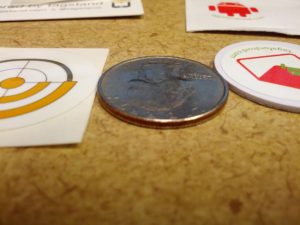
I originally bought a pack of tags and a keychain from tagsfordroid.com through Amazon.  These tags are pretty beefy.  In using NFC Task Launcher, I posted a twitter update that ultimately earned me two free tags from tagstand.  I noticed theirs seems much thinner.

The differences are substantial, as illustrated in the image below.

Substantial Difference


The tagstand sticker is a normal sticker thickness.  The tagsfordroid.com sticker is much thicker.

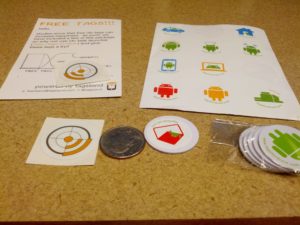
The image below shows the entire group - the two tags from tagstand and a stack of tags from tagsfordroid and a set of a dozen decals to apply to the tags so you know what your tags do.

The entire setup

Disclaimers:

While the tags provided by tagstand were free, they do this for anyone that downloads the NFC Task Launcher app and posts a twitter update using the application.  They aren't aware I'm writing this, the tags were not provided to help write this, and I've not been offered any compensation for writing this.

I am not trying to show that one is better than the other.  Both tags work.  There are times one may want a thicker tag, and there are times that one may want a thinner tag.  The purpose of this post is to illustrate a difference between the two.


Reloaded Kindle Fire with AOKP... fixed navbar issue

January 9th, 2013

I loaded my old Kindle Fire with AOKP.  This is awesome!

But...

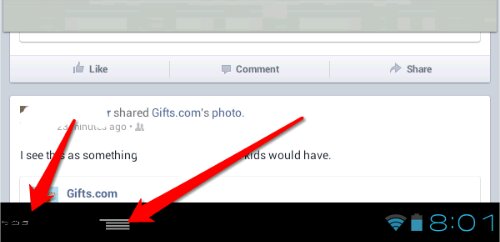
I had a problem in Facebook and Twitter. On Facebook, the application menu made the back, home, and application switch menu so small I had a bit of trouble using them.  On Twitter, there was no application menu button, so I couldn't switch Twitter accounts (I have three Twitter accounts):

image

image

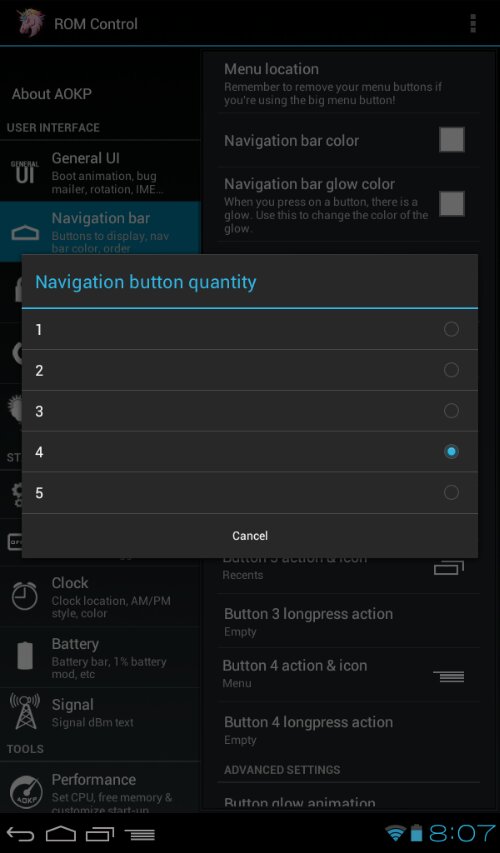
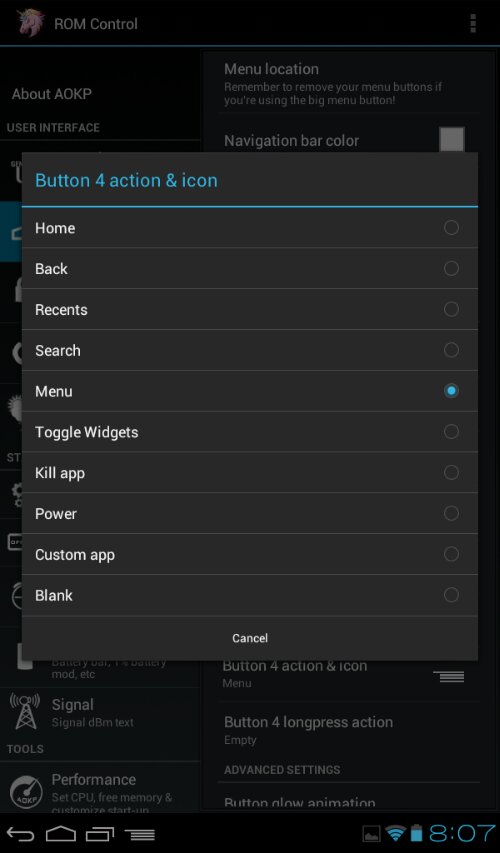
So I was poking around in the ROM Settings and ultimately stumbled on a solution. The solution is to add a fourth button to the navbar, set it as the menu, and leave well enough alone.

image

image

As illustrated in these screenshots, the problem is solved:

image

image

That's it!

Reading a Cube Voyager Path File from Java

October 8th, 2012

As a follow-up to my prior post, this is how to use the Cube Voyager API to read a path file.  I highly recommend you read the other article first, as it talks more about what is going on here.

The Interface

The interface for the path reader is larger because of the return structure.  The code below includes the interfaces to the DLL calls and the structure for the path data returned by some of them.  Note that I didn't do PathReaderReadDirect.  It doesn't seem to work (or I'm not trying hard enough).

The Code

Once the interface is in place, the code is reasonably simple.  However, I'm seeing a few interesting things in the costs and volumes in both C++ and in Java, so I wouldn't use those values.  I guess if you need to determine the costs, you should save the costs with the loaded highway network to a DBF file and read that into an array that can be used to store and get the values.

The Final Word... For Now

Java is a great programming language.  Using these DLLs can help you do some interesting stuff.  However, it seems that there are very few people using the API, which is concerning.  I personally would like to see an interface for reading .NET files and writing matrices.  But I can't expect Citilabs to put time in on that when it seems there are so few people using it.


Reading a Cube Voyager Matrix from Java using JNA

October 5th, 2012

I've begun to really enjoy Java.  It's hot, black exterior exposes a sweet bitterness that matches few other things in this world.  Oh, wait, this is supposed to be about the other Java - the programming language!

The "Holy Grail" of API programming with Cube Voyager to me has been using the API in Java.  I can program in C++ quite well, but I have a staff that can't.  We're likely going to be going to a Java based modeling structure in the next few years, so  it makes sense to write everything in Java and keep the model down to two languages - Cube Voyager and Java.

Setting up the Java Environment

There are three things to do to setup the Java environment to make this work.  The first is to place the Cube DLL in the right location.  The second is to get JNA and locate the libraries to where you need them.  The final is to setup the Java execution environment.

First, copy the VoyagerFileAccess.dll file (and probably it's associated lib file) to C:\Windows.  It should work.  I'm using a Windows 7-64 bit machine, so if it doesn't work, try C:\Windows\System32 and C:\Windows\System.

Second, get JNA.  This allows the Java compiler to connect to the DLL.  The latest version can be downloaded from Github (go down to "Downloads" under the Readme.md... just scroll down 'till you see it, and get both platform.jar and jna.jar).

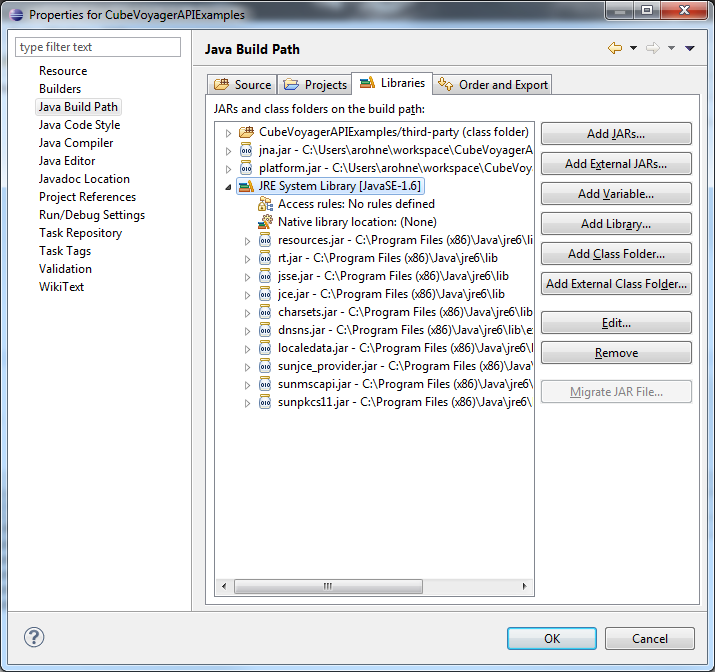
If you're on a 64-bit computer, the second thing to do is to set your jdk environment to use a 32-bit compiler.  I use Eclipse as my IDE, so this is done through the project properties.  One location is the Java Build Path - on the Libraries tab, make sure the JRE System Library is set to a 32-bit compiler.  In the Java Build Path screenshot below, you can see that all the locations are in C:\Program Files (x86) - this is an easy (although not foolproof) way to show that this is a 32-bit compiler.

Java Build Path Window

While you're setting up stuff in this window, make sure the jna.jar and platform.jar are linked here as well (click "Add External JARs..." and locate those two files).

Another place to check in Eclipse is the Java Compiler settings, which should have "Use Compliance from execution environment..." checked.

The Programming

The thing that makes this work is this part of the programming.  You can see in this that I create an interface t0 the Voyager DLL file by loading the DLL, and then setup some pointer objects to hold the memory pointer variable (the "state" variable in all of these) and set up the functions to read from the matrix.

The next part that makes this work is the actual programming. In the code below, the first thing I do is define vdll as an instance of the voyagerDLL interface.  Then, I open a matrix file (yes, it is hard-coded, but this is an example!), get the number of matrices, zones, the names, and I start reading the matrix (in the for loops).  I only print every 100th value, as printing each one makes this slow a bit. The actual reading is quite fast.  Finally, I close the matrix and the program terminates.

Issues

The big issue I noticed is that if the matrix is not found, the Pointer variable returned by MatReaderOpen will be null, but nothing will be in the error value.  I've tried redefining the error value to be a string in the interface, but it does the same thing.  However, I don't recall if it did anything in C++.  At any rate, there needs to be some error checking after the matrix is opened to ensure that it actually has opened, else the program will crash (and it doesn't do a normal crash).

Next Up

The next thing I'm going to do is the path files.

Using the Voyager API for Path Analysis

August 3rd, 2012

Just posted on Github: Path2CSV

This is a tool that will read a Cube Voyager Path file and output the contents by node to a CSV file.  The code is written in C++ and available under the GPL3 license.


Interesting INT() Issue Between Cube and Excel

July 24th, 2012


I don't know about anyone else, but I do a lot of calculation prototyping in Excel before applying that in scripts.  One of the most recent was to do a script to add expansion zones (also known as "dummy zones", although they aren't really dumb, just undeveloped!).

The problem I had was related to the following equation:

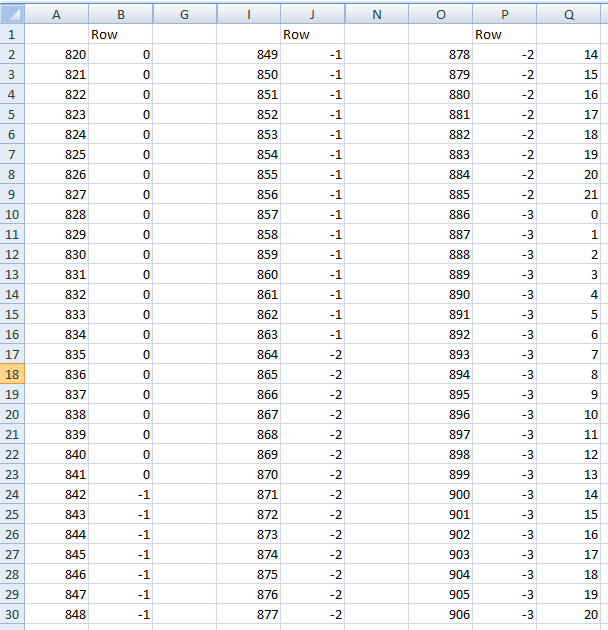
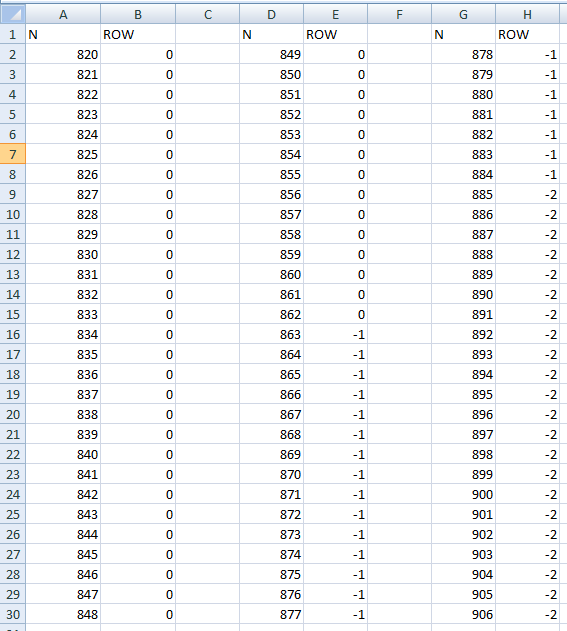
R=INT((819-N)/22)+1   Where N={820..906}

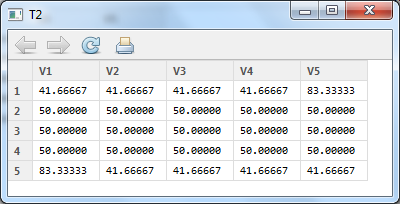
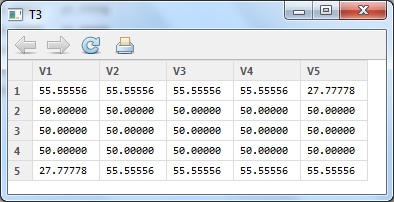
In Excel, the results are as below (click on it if it is too small to see):

In Cube, I got the result of (click on it to expand, and I only took it into Excel to move stuff around and make it easier to see):

Note the sheer number of zeroes in the Cube version and all the numbers are 'off'.

The reason, as I looked into things was because of how INT() works differently in the two platforms.  In Cube, INT simply removes everything to the right of the decimal, so INT(-0.05) = 0, and INT(-1.05)=-1.  In Excel, INT rounds down to the nearest integer.  This means that negative values will be different between the two platforms.  Note the table below.

Excel Cube
3.4 3 3
2.3 2 2
1.1 3 1
0.5 0 0
0 0 0
-0.5 -1 0
-1.1 -2 -1
-2.3 -3 -2
-3.4 -4 -3

While neither software is truly wrong in it's approach (there is no standard spec for INT()) it is important to know why things may not work as expected.

What Have I Been Up To Lately?

July 23rd, 2012

I've been up to a few things that haven't made it to this blog.

First, I've done a few conversion tools for converting Tranplan/INET to Voyager PT and back again.  These are open-source tools that are meant to help, but they may not be perfect (and I don't have the time to make sure they do).  If anyone wants to upload fixes, you'll get credit for it (but you have to let me know, as I think I have to allow that in Github).

Next, I've been heavily working on QC of my transit on-board survey.  This has resulted in some more work being uploaded to Github.  I've written some to assist in trying to figure out what I need to actually look at and what is probably okay enough to ignore.

I've seen some stuff come out of the Census related to an API, and I did post some example code to the CTPP listserve to help.  Since I didn't want to bog down some people with my code, I put it in a Gist (which is below).

This code will get Census data using their API and chart it.  Note that you have to install PyGTK All-In-One to make it work.  Of course, mind the items that Krishnan Viswanathan posted to the Listserve - they help make sense of the data!

I'm also working on an ArcMap add-in that will help with QC-ing data that has multiple elements.  It is on Github, but currently unfinished.  This is something for advanced users.

I will have a few tips coming for some Cube things I've done recently, but those will be for another blog post.  With that, I will leave with the first publicly-available video I've ever posted to YouTube.  Of a traffic signal malfunction.  I'm sure Hollywood will start calling me to direct the next big movie any day now... :-)
Playing with Google Docs Scripts and Get Satisfaction

March 15th, 2012

Sometimes I do things that don't really have a point... yet. One of them was pulling some information from GetSatisfaction (GSFN) to a Google Docs Spreadsheet (GDS). GSFN has an API that returns everything in JSON, so writing script in a GDS to pull in that information is quite easy.

The first step is to create a spreadsheet in Google Docs.  This will act as a container for the data.

The second step is to create a script to parse the JSON output and put it in the spreadsheet.  An example of this, which is a script I used to only get the topic, date, and type of topic (question, idea, problem, or praise).  It's simple, and it can be expanded on.  But for the sake of example, here it is:

function fillGSFN() {
  var r=1; 
  for(var page=89;page<200;page++){
    var jsondata = UrlFetchApp.fetch("http://api.getsatisfaction.com/companies/{COMPANY}/topics.json?page="+page);
    var object = Utilities.jsonParse(jsondata.getContentText());
    var ss=SpreadsheetApp.getActiveSpreadsheet();
    var sheet=ss.getSheets()[0];
    
    for(var i in object.data){
      sheet.getRange(r, 1).setValue(object.data[i].subject);
      sheet.getRange(r,2).setValue(object.data[i].created_at);
      sheet.getRange(r,3).setValue(object.data[i].style);
      r++;
    } 
    if(i!="14") return 1; //This was not a full page
  }
}

This script is still a work in progress, and there are better ways to consume a JSON feed, but for what I was doing, this was a nice quick-and-simple way to do it.

Arduino Based Bluetooth Scanners

September 30th, 2011

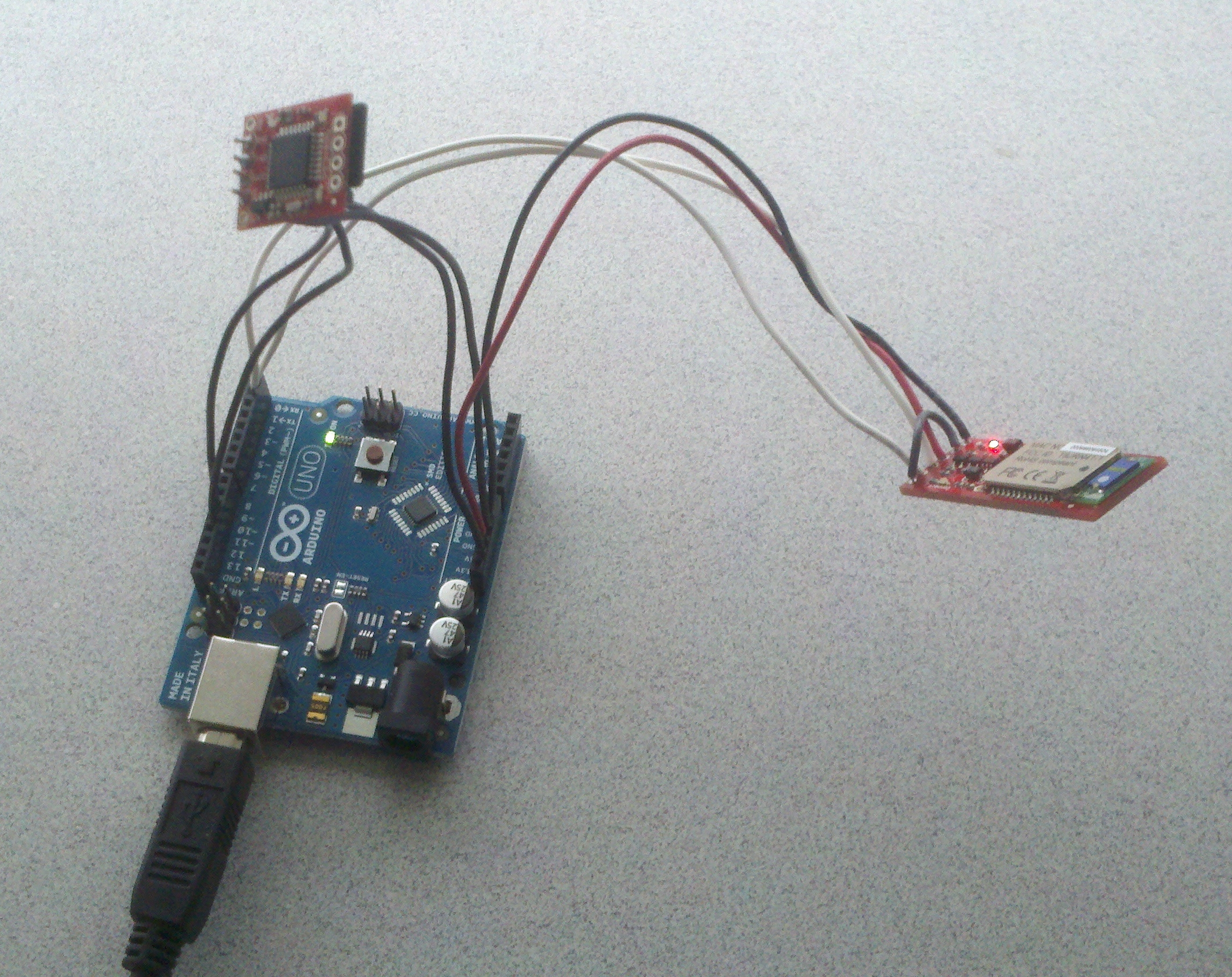
This is a post about a work in progress...

If you're in the transportation field, you've likely heard of the Bluetooth Scanners that cost around $4,000 each. These devices scan MAC (Media Access Control) addresses and log them (with the time of the scan) and use that for travel time studies or for origin-destination studies.

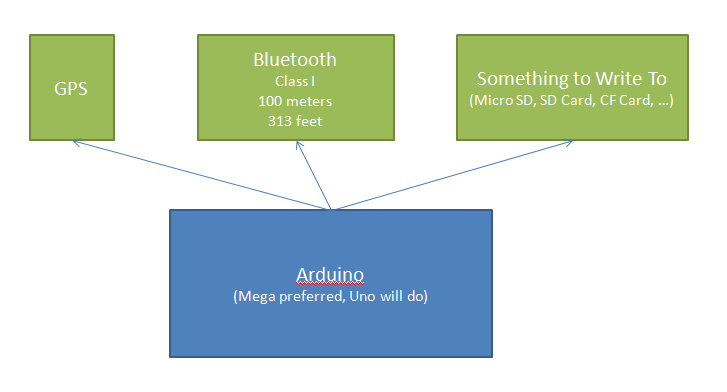
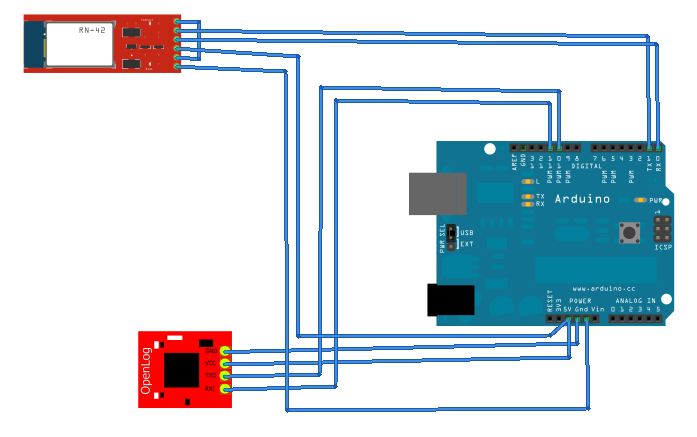
My question is, can we build something good-enough with an Arduino for much less money? Something like the concept below?


There's reasons for everything:

Arduino

Controls it all and brings it together.  Turns on the GPS, Bluetooth, listens to the stream of data from both, writes to the memory card.

GPS

The Arduino has no real-time clock (meaning that unless you tell it what time it is, it doesn't know!).  The GPS signal includes time.  It also includes position, which would be pretty useful.

Bluetooth

If we're going to scan for Bluetooth MAC addresses, something to receive them might come in handy...

Something to Write To

Scanning the addresses would be pretty pointless without storing the data.

Initial Design


/*
Bluetooth Tracker
Written by Andrew Rohne (arohne@oki.org)
www.oki.org
*/

#include 
#include 

NewSoftSerial ol(10,11);

char inByte;
boolean ext=false;

void setup(){
  String btreturn;
  Serial.begin(115200);
  delay(1500);
  Serial.print("$$$");
  delay(1000);

}

void loop(){
  byte incomingByte=-1;
  byte index=0;
  char macaddys[160];

  while(Serial.available()&gt;0){
    index=0;
    Serial.println("IN15");
    delay(16500);
    incomingByte=Serial.read();
    while(incomingByte>-1 && index<160){
      macaddys[index]=(char)incomingByte;
      index++;
      incomingByte=Serial.read();
    }
    if(macaddys!=""){
      Serial.end();
      writelog((String)millis()+":"+macaddys+"\r\n");
      Serial.begin(115200);
    }
  }
  if(Serial.available()<=0){
    delay(1000);
    Serial.begin(115200);
  }
    
}

void writelog(String line)
{
  ol.begin(9600);
  ol.print(line);
  ol.end();
}

The Results

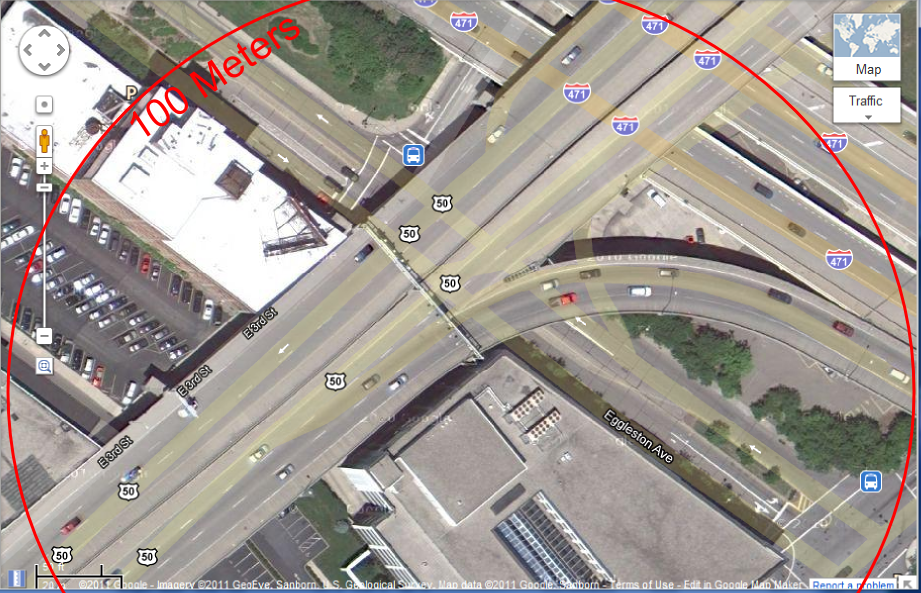
The program wrote about 5kb of text to the file before dying after 489986 milliseconds (8 minutes). I had left it on a windowsill overnight (the windowsill is literally about 15 feet from Fort Washington Way in Cincinnati, which is 6 lanes (see below for the range centered on roughly where the setup was located).

There were 9 unique Bluetooth MAC addresses scanned. During the 8 minutes, there were 25 groups of MAC addresses written to the file. 5 MAC addresses appeared in multiple groups, with 3 of the MAC addresses appearing in 24 of the groups (and they may have appeared in the last group, it appears to have been cut off). Those same 4 have been seen in earlier tests, too, so I don't know what's going on there.

The Problems to Fix

Well, first there's the problem that I had let it run all night, and it only had 8 minutes of data. Something is causing the Arduino to stop writing or the OpenLog to stop operating.

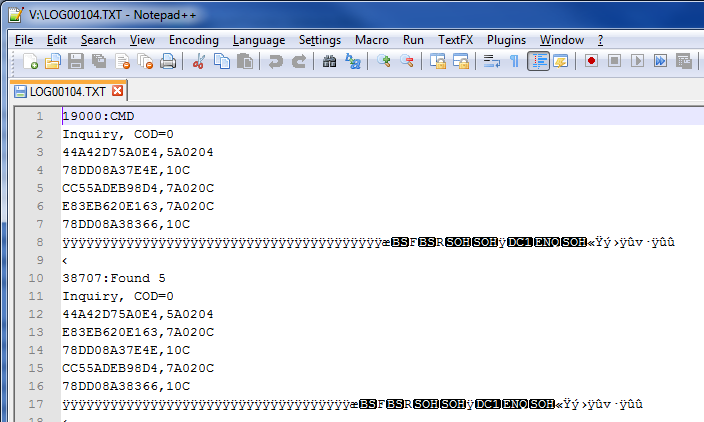
In the output file, there are a few issues. First, some processing needs to be done, and second, it appears I am reading past the end of the serial buffer (if you look in the image below, you can see a lot of characters that look like a y with an umlaut).

In the code above, the IN15 command is sent to the Bluetooth Mate Gold, which tells it to inquire for 15 seconds, and then I delay for 16.5 seconds. This is because I THINK there is a delay after the scan finishes. I don't know how long that delay is. Vehicles traveling by at 65 MPH is 95.333 feet per second. Assuming I can get the Bluetooth device very close to the road, that 1.5 second gap SHOULD be okay, but if I have to go longer it could be a problem (the range of a Class 1 Bluetooth device is 313 feet, so a device can be scanned anytime in 626 feet (up to 313 feet before the Bluetooth Station and up to 313 feet after the Bluetooth station). A vehicle would be in range for about 6.6 seconds. However, the Bluetooth signal is at 2.4 - 2.485 Ghz, and is susceptible to some interference from the vehicle, driver, passengers, etc., so speed is key.

Conclusion

I'm on the fence as to whether or not the Bluetooth Mate Gold is the right way to do this. I will still be doing some research to see if I can get better speed out of it, or if I need to look into a different receiver that can receive the 2.4 GHz area and look for MAC addresses and stream them to the Arduino.

I also need to get the GPS up and running. That is a different story altogether, as I have been trying on that and have not been successful (despite using code that works for my personal Arduino and GPS, although the model of GPS 'chip' is different.

More Voyager PT + AWK Goodness

September 20th, 2011

One thing I've missed from the old TranPlan days was the reporting group.  We've used that for many years to compare our transit loadings by major corridor.  Unfortunately, that functionality was lost going to PT.  I still need it, though, and enter awk.

The script below looks at the transit line file and outputs ONLY the line code, comma-separated.  It uses a loop to check each field for ' NAME=' and 'USERN2', which is where we now store our reporting group codes.

BEGIN{
FS=","
RS="LINE"
}
{
	for (i=1;i<20;i++)
	{
		if($i~/ NAME=/)
		{
			printf "%s,",substr($i,8,length($i)-8)
		}
		if($i~/USERN2/)
		{
			printf "%s\n",substr($i,9)
		}
	}
}

The contents of the above need to be saved to a .awk file - I used trn.awk.

To call this, I use a Pilot script to call awk and pass the input and get the output.

*awk -f {CATALOG_DIR}/INPUTS/trn.awk {CATALOG_DIR}/INPUTS/OKIROUTES.LIN >{CATALOG_DIR}/OKIROUTES.CSV

The output of this is a simple two-column comma-separated-value file of the route ID and the reporting group.

Using Gawk to get a SimpleTransit Loadings Table from Cube PT

September 19th, 2011

One thing that I don't like about Cube is the transit loadings report is stuck in the big program print report.  To pull this out, the following code works pretty well:

gawk /'^REPORT LINES  UserClass=Total'/,/'^Total     '/ 63PTR00A.PRN >outputfile.txt

Where 63PTR00A.PRN is the print file. Note the spaces after ^Total. For whatever reason, using the karat (the '^') isn't working to find 'Total' as the first thing on the line. So, I added the spaces so it gets everything. Outputfile.txt is where this will go. It will just be the table.

NOTE: You need GNUWin32 installed to do this.

Using GAWK to Get Through CTPP Data

August 18th, 2011

The 3-year CTPP website lacks a little in usability (just try getting a county-county matrix out of it).

One of the CTPP staff pointed me to the downloads, which are a double-edge sword. On one hand, you have a lot of data without an interface in the way. On the other hand, you have a lot of data.

I found it was easiest to use GAWK to get through the data, and it was pretty easy:

gawk '/.*COUNTY_CODE.*/' *.csv &gt;Filename.txt

Where COUNTY_CODE is the code from Pn-Labels-xx.txt where n is the part number (1,2, or 3) and xx is the state abbreviation.

NOTE: Look up the county code EACH TIME.  It changes among parts 1, 2, and 3.

This command will go through all .csv files and output any line with the county code to the new file.

UPDATE

I have multiple counties to deal with.  There's an easy way to start on getting a matrix:

gawk '/C4300US.*(21037|21015|21117).*32100.*/' *.csv &gt;TotalFlowsNKY.csv

This results in a CSV table of only the total flows from three Northern Kentucky counties (21037, 21015, 21117; Campbell, Boone, and Kenton county, respectfully).  For simplicity's sake, I didn't include all 11 that I used.

Finishing Up

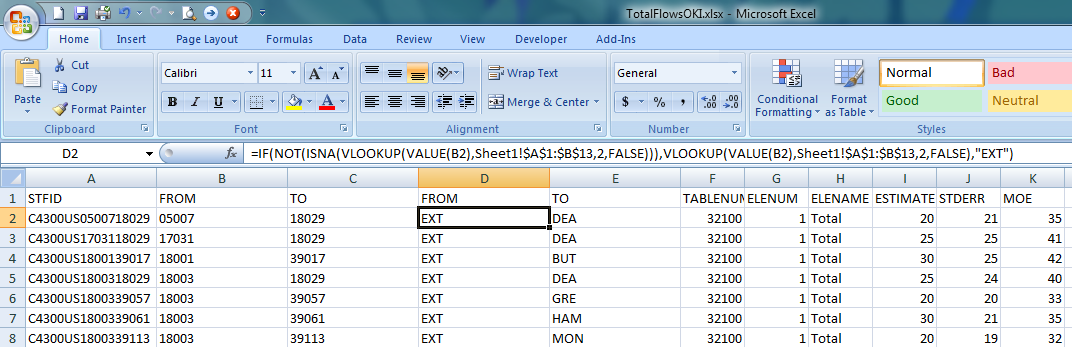
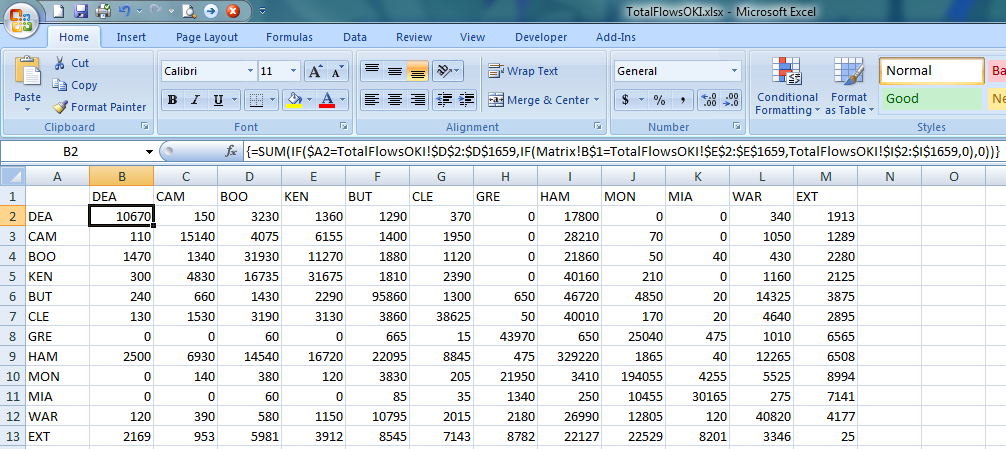
Then, I did a little Excel magic to build a matrix for all 11 counties and externals.  The formula is shown.  I have an additional sheet which is basically a cross reference of the county FIPS codes to the name abbreviations I'm using.  See the image below (click for a larger version).

After this, I built a matrix in Excel.  The matrix uses array summation (when you build this formula, you press CTRL+Enter to set it up right, else the returned value will be 0).

Using these techniques, I was able to get a journey to work matrix fairly quickly and without a lot of manual labor.

NOTE

You need to have GNUWin32 installed to use gawk.


Using gawk to Get PT Unassigned Trips Output into a Matrix

July 15th, 2011

In the process of quality-control checking a transit on-board survey, one task that has been routinely mentioned on things like TMIP webinars is to assign your transit trip-table from your transit on-board survey.  This serves two purposes - to check the survey and to check the transit network.

PT (and TranPlan's LOAD TRANSIT NETWORK, and probably TRNBUILD, too) will attempt to assign all trips.  Trips that are not assigned are output into the print file.  In PT (what this post will focus on), will output a line similar to this:


W(742): 1 Trips for I=211 to J=277, but no path for UserClass 1.

When a transit path is not found.  With a transit on-board survey, there may be a lot of these.  Therefore, less time spent writing code to parse them, the better.

To get this to a file that is easier to parse, start with your transit script, and add the following line near the top:


GLOBAL PAGEHEIGHT=32767

This removes the page headers. I had originally tried this with page headers in the print file, but it created problems. Really, you probably won't print this anyway, so removing the page headers is probably a Godsend to you!

Then, open a command line, and type the following:

gawk '/(W 742 .*)\./ {print $2,$5,$7}' TCPTR00A.PRN >UnassignedTransitTrips.PRN

Note that TCPTR00A.PRN is the transit assignment step print file, and UnassignedTransitTrips.PRN is the destination file. The {print $2,$5,$7} tells gawk to print the second, fifth, and seventh columns. Gawk figures out the columns itself based on spaces in the lines. The >UnassignedTransitTrips.PRN directs the output to that file, instead of listing it on the screen.

The UnassignedTransitTrips.PRN file should include something like:


1 I=3 J=285,
1 I=3 J=289,
1 I=3 J=292,
1 I=6 J=227,
1 I=7 J=1275,

The first column is the number of unassigned trips, the second column is the I zone, and the last column is the J zone.

This file can then be brought into two Matrix steps to move it to a matrix. The first step should include the following code:

RUN PGM=MATRIX PRNFILE="S:\USER\ROHNE\PROJECTS\TRANSIT OB SURVEY\TRAVELMODEL\MODEL\TCMAT00A.PRN"
FILEO RECO[1] = "S:\User\Rohne\Projects\Transit OB Survey\TravelModel\Model\Outputs\UnassignedAM.DBF",
 FIELDS=IZ,JZ,V
FILEI RECI = "S:\User\Rohne\Projects\Transit OB Survey\TravelModel\Model\UnassignedTransitTrips.PRN"

RO.V=RECI.NFIELD[1]
RO.IZ=SUBSTR(RECI.CFIELD[2],3,STRLEN(RECI.CFIELD[2])-2)
RO.JZ=SUBSTR(RECI.CFIELD[3],3,STRLEN(RECI.CFIELD[3])-2)
WRITE RECO=1

ENDRUN

This first step parses the I=, J=, and comma out of the file and inserts the I, J, and number of trips into a DBF file. This is naturally sorted by I then J because of the way PT works and because I am only using one user class in this case.

The second Matrix step is below:

RUN PGM=MATRIX
FILEO MATO[1] = "S:\User\Rohne\Projects\Transit OB Survey\TravelModel\Model\Outputs\UnassignedAM.MAT" MO=1
FILEI MATI[1] = "S:\User\Rohne\Projects\Transit OB Survey\TravelModel\Model\Outputs\UnassignedAM.DBF" PATTERN=IJM:V FIELDS=IZ,JZ,0,V

PAR ZONES=2425

MW[1]=MI.1.1
ENDRUN

This step simply reads the DBF file and puts it into a matrix.

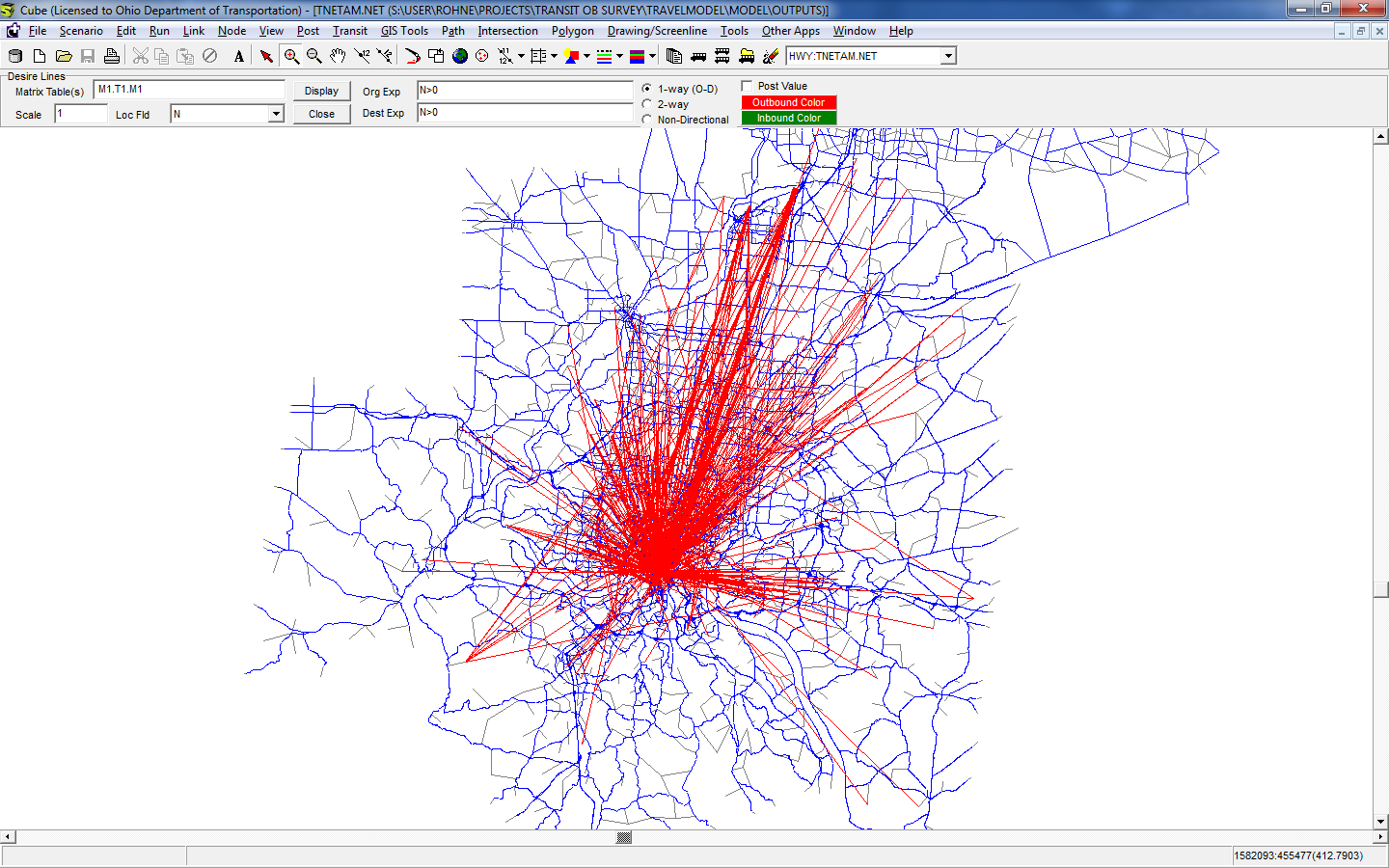
At this point, you can easily draw desire lines to show the unassigned survey trips. Hopefully it looks better than mine!

Getting the 2nd Line through the Last Line of a File

June 24th, 2011

One recent work task involved compiling 244 CSV traffic count files and analyzing the data.

I didn't want to write any sort of program to import the data into Access or FoxPro, and I didn't want to mess with it (since it would be big) in Excel or Notepad++.

So, I took the first of the 244 files and named it CountData.csv. The remaining files all begin with 'fifteen_min' and they are isolated in their own folder with no subfolders.

Enter Windows PowerShell really powered up with GNUWin.

One command:
awk 'NR==2,NR<2' .\f*.csv >> CountData.csv

awk is a data extraction and reporting tool that uses a data-driven scripting language consisting of a set of actions to be taken against textual data (either in files or data streams) for the purpose of producing formatted reports (source: Wikipedia).

The first argument, NR==2 means start on record #2, or the second line in the file.
The second argument, NR<2, means end on the record less than 2. In this case, it always returns false, and thus the remainder of the file is output. The .\f*.csv means any file in this folder where the first letter is f and the last 4 letters are .csv (and anything goes between them). The '>> CountData.csv' means to append to CountData.csv

Once I started this process, it ran for a good 45 minutes and created a really big file (about 420 MB).

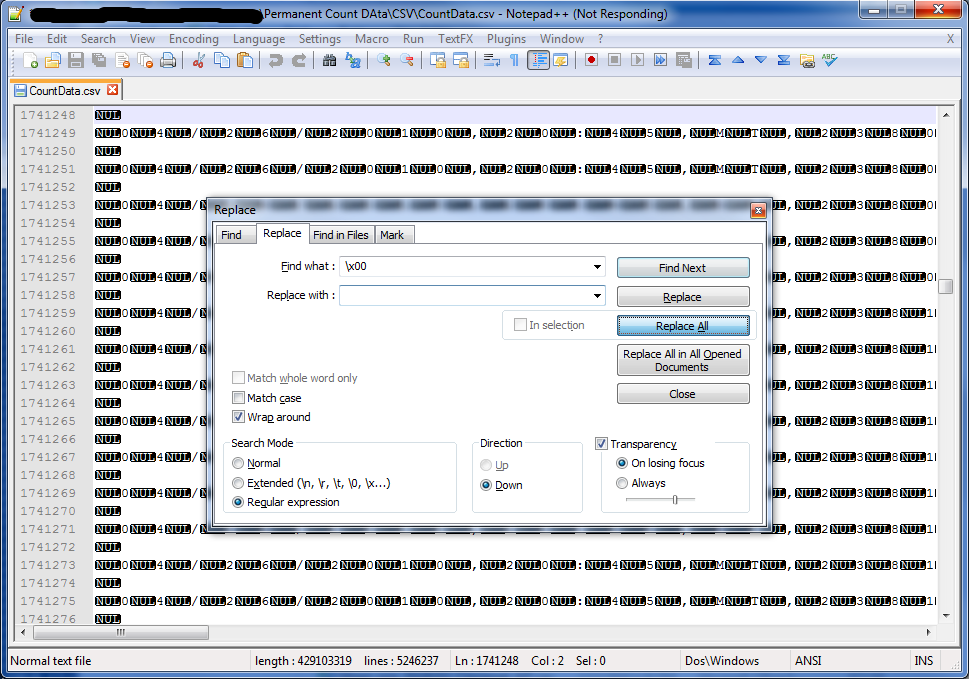
After all this, I saw a bunch of "NUL" characters in Notepad++, roughly one every-other-letter, and it looked like the data was there (just separated by "NUL" characters).  I had to find and replace "\x00" with blank (searching as Regular Expression).  That took a while.

Acknowledgements:

The Linux Commando.  His post ultimately helped me put two and two together to do what I needed to do.

Security 102.  The NUL thing.

Emailing an alert that a model run is complete in Cube Voyager

March 6th, 2011

When you are doing many model runs, it makes life easier to know if the modelrun is complete.  The code is below.

SENDMAIL,
SMTPSERVER='MAILSERVER HERE',
FROM='from@somwehere.com',
TO='to@somewhere.com',
SUBJECT='Subject Line Here',
MESSAGE='Message Goes Here',
USERNAME='username',
PASSWORD='password'

The things you replace here are pretty obvious.  If you have questions about the SMTPSERVER parameter, ask your IT person.  Also, for Windows domains, the USERNAME parameter should be 'DOMAIN\USERNAME' (you may be able to use your email address, depending on your email setup).

Adding a Search Engine in Chrome to Track UPS Shipments

December 22nd, 2010

One of the cool features of the Google Chrome Browser is the ability to add search engines and search them from the address bar. This tip builds on that capability to track UPS shipments based on their UPS Tracking Number.

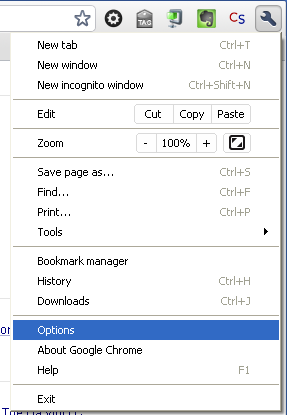
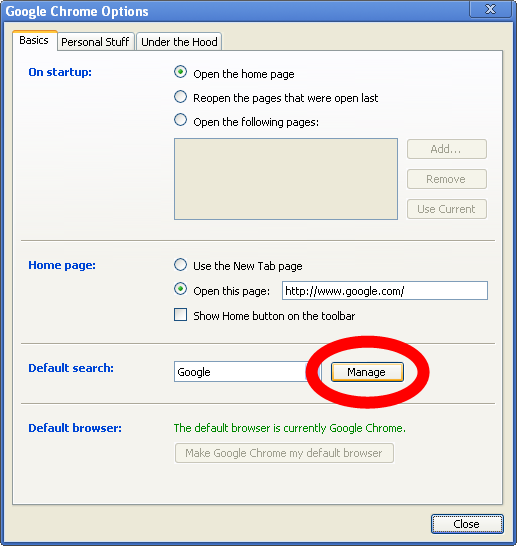
The first step is to go to the options menu by clicking on the wrench icon and going to Options:

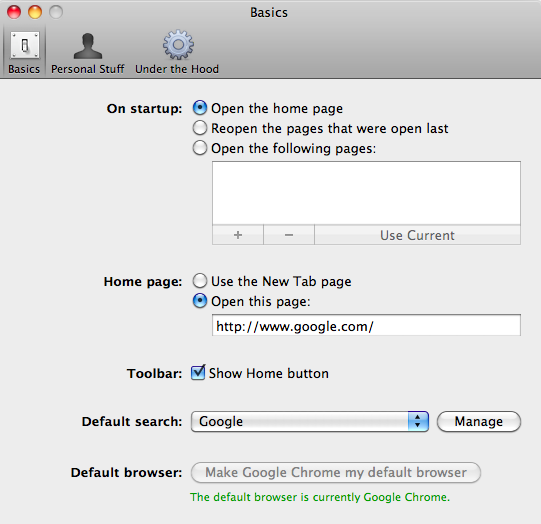
The second step is to go to the Basics tab (or on Mac, click on the Basics icon)

Step 2: Manage Search Engines Step 2: Manage Search Engine (OS X)

The third step is to add the search engine.  On Windows, click Add, and then fill out the resulting form, on OS X, click the '+' button and do the same.

Step 3: Add a Search EngineStep 3: Click on the '+' and add the search engine settings (OS X)

Windows Form:

Windows Form

The following are the items for the form:

Name: UPS

Keyword: UPS

URL: http://wwwapps.ups.com/WebTracking/processInputRequest?sort_by=status&tracknums_displ ayed=1&TypeOfInquiryNumber=T&loc=en_US&InquiryNumber1=%s&track.x=0&track.y=0

NOTE: The entire URL above should be one line with no spaces!

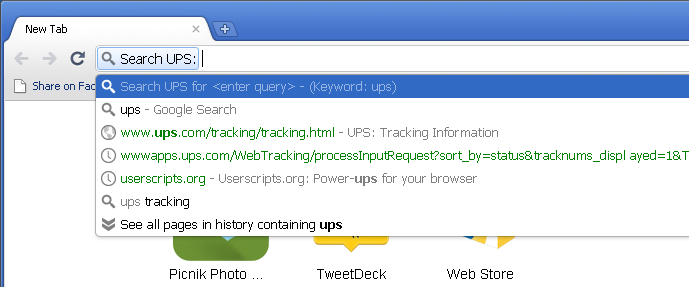
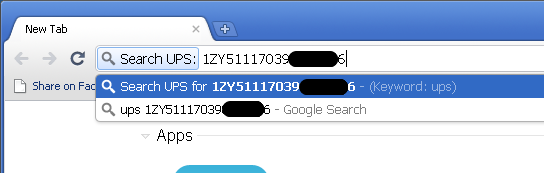
Click OK on everything (or in some cases, the red circle on OS X).  To use this, open Chrome, type 'ups' in the address bar and press Tab and enter the tracking number (copy-paste works well for this).

Type 'UPS' in the address bar...

...Press Tab, and paste your tracking number...

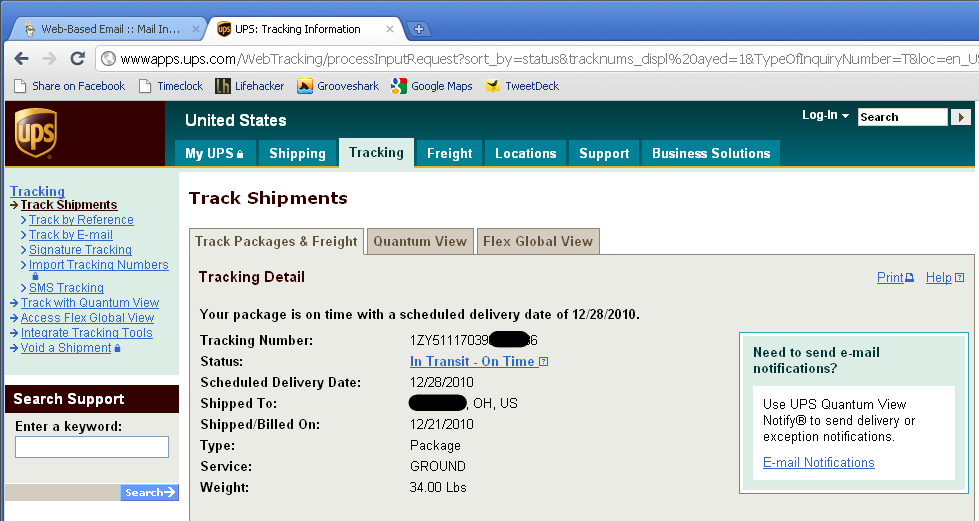
Once you press Enter, you will immediately go to the UPS website showing your tracking information.  In this case, my shipment won't make it by Christmas.  Oh well.

...and see your tracking information

Python and Cube

December 19th, 2010

One of the advantages of the ESRI ArcGIS Framework is that you can write Python scripts that do GIS things and run them from Cube.  Even better, Cube uses the Geodatabase format, so you can store and retrieve things from there.

The first thing that is needed is a python script.  The below is an example that we're not using at the moment, but it merges multiple transit line files together.

import arcgisscripting, sys, os
gp=arcgisscripting.create()

gp.AddToolbox("C:/Program Files/ArcGIS/ArcToolBox/Toolboxes/Data Management Tools.tbx")

print sys.argv

input1=sys.argv[1]
input2=sys.argv[2]
output=sys.argv[3]

in1=input1+input1[input1.rfind("\\"):]+"_PTLine"
in2=input2+input2[input2.rfind("\\"):]+"_PTLine"

input=in1+';'+in2
input=input.replace("\\","/")
output=output.replace("\\","/")

print input
print output

if gp.Exists(output):
    gp.delete_management(output)

#input=input1+"_PTLine" +';'+input2 +"_PTLine"

gp.Merge_management(input,output)

print gp.GetMessage

del gp

To call this, we add the following in a Pilot script:

*merge.py {CATALOG_DIR}\Inputs\Transit.mdb\Routes1 {CATALOG_DIR}\Inputs\Transit.mdb\Routes2 {CATALOG_DIR}\Inputs\Transit.mdb\RoutesCombined

This makes it easy to create geoprocessing steps in ArcMap, export them to Python, and call them from the model.

Top 6 Resources for a Travel Modeler to Work From Home

December 16th, 2010

It's the most wonderful time of the year, isn't it?  Nothing says "winter" like 6 inches of snow that keeps you from going to the office!

Over the years, I've amassed a set of utilities, many of them free, to make my life easier.  This list can sometimes take the place of things that I would normally use in the office, other times they are things that sync to the "cloud" and I use them both in the office and at home.

1. Dropbox

I don't care too much for USB "thumb" drives, and I've had my fair share of leaving them at home or at work and needing them at the opposite location.  Dropbox clears up this mess, as there are no USB drives to lose or leave in the wrong place.  NOTE: the link that I have IS a referral link.  Clicking on that and creating an account results in both of us getting an extra 250 MB of space with the free account (starts at 2 GB, max for free is 8 GB).

2. Evernote

I take a lot of notes, both on the road at conferences and at the office.  Evernote is what I use to keep them organized.

3. Google Docs

Unless you want to spring for Microsoft Office at home, Google Docs is the way to go.  There are several others including Zoho and Office Online, but I haven't used them.  Google Docs has great collaboration features, document versioning, and its free.  Just make sure to back it up! The only problem: no DBF file support.

4. Notepad++

This is perhaps the greatest text editor.  It understands and does some context highlighting (etc) for many programming languages.  Even better, Colby from Citilabs uploaded his language definition file for Cube Voyager to the user group!

5. Microsoft Visual {whatever} Express Edition

The Express Edition tools have become our go-to tools for new development, particularly MS Visual C++ EE and MS Visual Basic EE.  Since they're free, you can have copies both at home and work.

6. Eclipse

This one's almost optional, but for those working with Java models, this is the standard IDE, and it is open source.

Any tools to add?  Add them in the comments below.

Using a Class Object to Help Read a Control File

December 5th, 2010

One thing we're used to in travel modeling is control files.  It seems to harken back to the days of TranPlan where everything had a control file to control the steps.

In my case, I have a control file for my nested logit mode choice program, and because of the age of the mode choice program, I want to redesign it.  The first part of this is reading the control file, and I did a little trick to help with reading each control file line.  With C++, there is no way to read variables in from a file (like there is with FORTRAN).

The first part of the code reads the control file, and you will see that once I open and read the control file, I section it out (the control file has sections for files ($FILES), operation parameters ($PARAMS), operation options ($OPTIONS), and mode choice parameters ($PARMS). Each section ends with an end tag ($END). This adds the flexibility of being able to re-use variables in different locations.

After the section, the next portion of the code reads the line and checks to see if FPERIN is found. If it is, a ControlFileEntry object is created. This object is a class that is used to return the filename held in the object. This makes it easy to reduce code.

int readControlFile(char *controlFileName){
	cout &lt;&lt; "Reading " &lt;&lt; controlFileName &lt;&lt; endl;
	//Read the control file
	string line;
	bool inFiles=false, inParams=false, inOptions=false, inParms=false;
	ifstream controlFile(controlFileName);
	if(!controlFile.good()){
		cout &lt;&lt; "PROBLEMS READING CONTROL FILE" &lt;&lt; endl;
		return 1;
	}
	while(controlFile.good()){
		getline(controlFile,line);
		//check the vars sections
		if(line.find("$FILES")!=string::npos)
			inFiles=true;
		if(line.find("$PARAMS")!=string::npos)
			inParams=true;
		if(line.find("$OPTIONS")!=string::npos)
			inOptions=true;
		if(line.find("$PARMS")!=string::npos)
			inParms=true;
		if(line.find("$END")!=string::npos){
			inFiles=false;
			inParams=false;
			inOptions=false;
			inParms=false;
		}
		if(inFiles){
			cout &lt;&lt; "Checking files" &lt;&lt; endl;
			if(line.find("FPERIN")!=string::npos){
				controlFileEntry cfe(line);
				PerTrpIn=cfe.filename;
			}
//SNIP!!!
	return 0;
}

The controlFileEntry is code is below.  This is used at the top of the code, just below the preprocessor directives (the #include stuff).

class controlFileEntry{
public:
	string filename;
	controlFileEntry(string Entry){
		beg=(int)Entry.find("=")+2;
		end=(int)Entry.rfind("\'")-beg;
		filename=Entry.substr(beg,end);
	}
	~controlFileEntry(){
		beg=0;
		end=0;
		filename="";
	}
private:
	string Entry;
	int beg;
	int end;
};

The class has one public member, filename, which is what is read in the code where it is used. There are two public functions. The first is the constructor (controlFileEntry) which is used when creating the object. The second is the de-constructor (~controlFileEntry), which sets the beg, end, and filename variables to zero and blank.  The beg, end (misnomer), and the line sent to it are private and cannot be used in code.

This can be extended, as the file entry type is fine when there are quotes around the item (it is setup for that, note the -2 in beg).  I wrote a different one for integers, floating point, and boolean values.

class controlParamEntry{
public:
	int ivalue;
	bool bvalue;
	double dvalue;
	controlParamEntry(string Entry){
		beg=(int)Entry.find("=")+1;
		end=(int)Entry.rfind(",")-beg;
		ivalue=0;
		dvalue=0;
		if(Entry.substr(beg,end)=="T"){
			bvalue=true;
			ivalue=1;
			dvalue=1;
		}else if(Entry.substr(beg,end)=="F"){
			bvalue=false;
			ivalue=0;
			dvalue=0;
		}
		if(ivalue==0){
			ivalue=atoi(Entry.substr(beg,end).c_str());
		}
		if(dvalue==0){
			dvalue=atof(Entry.substr(beg,end).c_str());
		}
	}
	~controlParamEntry(){
		beg=0;
		end=0;
		ivalue=0;
		dvalue=0;
		Entry="";
	}
private:
	string Entry;
	int beg;
	int end;
};

As you can see above, there are return values for floating point (dvalue), integer (ivalue), and boolean (bvalue).

Tune in next week to see more of the code.

Reading a Matrix File in C++ and Doing Something With It

November 28th, 2010

Last week's post showed how to open a path file using C++. This week's post will show how to open a Cube Voyager matrix file in C++.

Setup

Like last week, we need to reference VoyagerFileAccess.lib in the project.  We also need to add the external references in the header file as below:

extern "C" __declspec(dllimport)void* MatReaderOpen(const char *filename, char *errMsg, int errBufLen);
extern "C" __declspec(dllimport)int MatReaderGetNumMats(void* state);
extern "C" __declspec(dllimport)int MatReaderGetNumZones(void* state);
extern "C" __declspec(dllimport)int MatReaderGetMatrixNames(void* state, char **names);
extern "C" __declspec(dllimport)int MatReaderGetRow(void* state, const int mat, const int row, double *buffer);
extern "C" __declspec(dllimport)void MatReaderClose(void* state);

Also ensure that the project is setup with the character set of "Not Set" as opposed to Unicode, which seems to be a default in MS Visual C++ Express Edition.

Main Application

The main application is fairly simple and just opens the matrix and outputs the number of tables and zones to the screen.

#include "stdafx.h"
#include &lt;stdio.h&gt;
#include &lt;iostream.h&gt;

using namespace std;

int _tmain(int argc, _TCHAR* argv[])
{
	char errMsg[256]="";
	// Open the matrix
	void* matrixState=MatReaderOpen(argv[1],errMsg,256);
	// Get number of tables in the matrix
	int nMats = MatReaderGetNumMats(matrixState);
	// Get number of zones in the matrix
	int nZones = MatReaderGetNumZones(matrixState);
	// Output to screen
	cout &lt;&lt; "File " &lt;&lt; argv[1] &lt;&lt; endl;
	cout &lt;&lt; "Number of Tables....." &lt;&lt; nMats &lt;&lt; endl;
	cout &lt;&lt; "Number of Zones......" &lt;&lt; nZones &lt;&lt; endl;
	// Close the matrix
	MatReaderClose(matrixState);
	cout &lt;&lt; "Matrix Closed." &lt;&lt; endl;
	cout &lt;&lt; "Press any key to close" &lt;&lt; endl; 	char tmp; 	cin &gt;&gt; tmp;
	return 0;
}

The output looks like the below:

Using the Path Files in the New Cube Voyager API

November 23rd, 2010

Matthew M., The Citilabs Director of Development, released an API to use C/C++ to read Voyager Matrixes and Highway Path Files.  I have started into using this API in C++ to read path files.

The first thing with the path files is that it is (as indicated in the documentation) Highway Path Files only.  I first tried PT Route Files (which can be read in Viper in the same way one could use Highway Path files), but alas, you receive an error when trying to do that.

For this, I have created a console application, which could become something to run in a model run.

Setup

The first thing is to setup your include file with the DLL references.

Start by adding a reference to VoyagerFileAccess.lib.  In Visual C++ Express 2010, right-click on your solution name and add an existing item (and point it to VoyagerFileAccess.lib).  Then, in a header file (or in your source file, but normal programming conventions seem to dictate that these items belong in headers), add the following lines:

extern "C" __declspec(dllimport)void* PathReaderOpen(const char *filename, char *errMsg, int errBufLen);
extern "C" __declspec(dllimport)void* PathReaderClose(void* state);
extern "C" __declspec(dllimport)int PathReaderGetNumZones(void* state);
extern "C" __declspec(dllimport)int PathReaderGetNumTables(void* state);

These lines tell the compiler that these four functions are imported through a DLL (and thus, it uses the lib file to know where to go).

The next thing, since this is a console application, is to correct the Character Set.  Right-click on the solution, go to properties, select Configuration Properties - General, and set the Character Set to "Not Set".  If you leave it on Unicode, your command line arguments will have only one letter.  See the screen capture below.

Main Application

This is a small application that just shows some simple reading the zones and tables in the path file.  The application takes one command-line argument.

The source, fully commented, is below.

#include "stdafx.h"

#include &lt;Windows.h&gt;

#include &lt;stdio.h&gt;

#include &lt;iostream&gt;

using namespace std;

int _tmain(int argc, char* argv[])

{

// dim variables
char errorMessage[256]="";
int Zones,Tables;

// Opens the path file and sets the Zones and Tables variables
void* state=PathReaderOpen(argv[1],errorMessage,256);
Zones=PathReaderGetNumZones(state);
Tables=PathReaderGetNumTables(state);

// Dumps the variables to the screen
cout &lt;&lt; "State of PathReaderOpen: " &lt;&lt; state &lt;&lt; endl;
cout &lt;&lt; "PathReaderErrorMessage: " &lt;&lt; errorMessage &lt;&lt; endl;
cout &lt;&lt; "Zones: " &lt;&lt; Zones &lt;&lt; endl;
cout &lt;&lt; "Tables: " &lt;&lt; Tables &lt;&lt; endl;

// Closes the path file
PathReaderClose(state);
cout &lt;&lt; "Path Reader Closed";

// This makes the command window wait for input from the user before closing
char tmp;
cin &gt;&gt; tmp;

return 0;
}

For debugging, you will want to set the command-line argument.  This is done by right-clicking on the solution and going to Configuration - Debugging.  See the screen capture below.

Output

The output of this is fairly simple:

In the coming weeks, I will post more about using this new API.

Voyager + C++ With Multi-Dimensional Arrays (Part 2: Writing)

November 7th, 2010

This is part 2 of using Cube Voyager Multi-Dimensional Arrays with C++. To see part 1, click here.

Building on last weeks post, the below shows the modifications necessary in Cube. The first thing I added is the variable itself (else, you will get one of those inexplicable errors). In this case, I add MDARRAY2 as a variable that is the same dimensions as MDARRAY. The second part that I add (which is after the CALL statement) is just to report the values stored in MDARRAY2.

RUN PGM=MATRIX PRNFILE="C:\TEMP\DTMAT00B.PRN"
FILEO PRINTO[1] = "C:\TEMP\DEBUG.PRN"

PAR ZONES=1

ARRAY MDARRAY=5,5, MDARRAY2=5,5

LOOP _c=1,5
  LOOP _r=1,5
    MDARRAY[_c][_r]=RAND()
    PRINT PRINTO=1 LIST='MDARRAY[',_c(1.0),'][',_r(1.0),']=',MDARRAY[_c][_r](8.6)
  ENDLOOP
ENDLOOP

CALL DLL=DLLFILE(TableReader)

LOOP _c=1,5
  LOOP _r=1,5
    PRINT PRINTO=1 LIST='MDARRAY2[',_c(1.0),'][',_r(1.0),']=',MDARRAY2[_c][_r](8.6)
  ENDLOOP
ENDLOOP
ENDRUN

In C++, I add a second variable for MDARRAY2 (called TableRecord2). It is critical that this is a double* variable, as this needs to be a pointer so Cube can access updated values of the variable. Similar with how I read MDARRAY into TableRecord, I do the same with MDARRAY2 and TableRecord2, which reads the pointers to MDARRAY2 into TableRecord2. Then, as I iterate through TableRecord, I set TableRecord2 to 10 * TableRecord. After this, the DLL is complete and Cube ultimately prints all the values to the print output.

int TableReader (Callstack* Stack){
	double* TableRecord;
	double* TableRecord2;
	char message[100];

	TableRecord=(double*)Stack-&gt;pfFindVar("MDARRAY",0,1,2,3,4,5,6,7,8,9,10,11,12,13,14,15,
                16,17,18,19,20,21,22,23,24);
	TableRecord2=(double*)Stack-&gt;pfFindVar("MDARRAY2",0,1,2,3,4,5,6,7,8,9,10,11,12,13,14,15,
                16,17,18,19,20,21,22,23,24);
	for(int x=0;x&lt;=24;x++){ 	if(&amp;TableRecord!=0){ 			 		sprintf(message,"TableRecord=%f",TableRecord[x]); 		Stack-&gt;pfPrnLine(1,message);
		TableRecord2[x]=TableRecord[x]*10;
		}
	}
	return 0;
}

Additional Considerations

If you decide to use this, you may want to pass the sizes of each dimension if it is important. Then, you can write a function to take the sequential value and return the column or row.

Voyager + C++ With Multi-Dimensional Arrays (Part 1: Reading)

October 31st, 2010

This is part 1 of this subject. Part 2 will be about writing values to the arrays.

One of the cool things with the latest version of Cube Voyager is multi-dimensional arrays. However, it appears behind the scenes (or at least to C++) that the multi-dimensional arrays are a wrapper over a single-dimension array.

The easiest way to show this is to make a random array and send it to the print file. Making the random array in Cube is simple:

RUN PGM=MATRIX PRNFILE="C:\TEMP\DTMAT00B.PRN"
FILEO PRINTO[1] = "C:\TEMP\DEBUG.PRN"

PAR ZONES=1

ARRAY MDARRAY=5,5

LOOP _c=1,5
  LOOP _r=1,5
    MDARRAY[_c][_r]=RAND()
    PRINT PRINTO=1 LIST='MDARRAY[',_c(1.0),'][',_r(1.0),']=',MDARRAY[_c][_r](8.6)
  ENDLOOP
ENDLOOP

CALL DLL=DLLFILE(TableReader)
ENDRUN

Then, in C++ we can pull 25 (!) array values from this:

int TableReader (Callstack* Stack){
	double* TableRecord;
	char message[100];

	TableRecord=(double*)Stack-&gt;pfFindVar("MDARRAY",0,1,2,3,4,5,6,7,8,9,10,11,12,13,14,15,
             16,17,18,19,20,21,22,23,24);
	for(int x=0;x&lt;=24;x++){
	if(&amp;TableRecord!=0){
		sprintf(message,"TableRecord=%f",TableRecord[x]);
		Stack-&gt;pfPrnLine(1,message);
		}
	}
	return 0;
}

For fixed size multi-dimensional arrays, this isn't really an issue. It would be very easy to wrap the Stack->pfFindVar line in a set of loops that fills a multi-dimensional array.

Getting GoogleCL to Download Drawings

October 20th, 2010

While looking into backing up my Google Docs, I realized that GoogleCL is not backing up drawings.

Fixing this requires a few minor modifications to the source in {download}\src\googlecl\docs\base.py (where {download} is where you downloaded the files}.

The first fix is in the try block on line 51.
was:

from gdata.docs.data import DOCUMENT_LABEL, SPREADSHEET_LABEL, \
                              PRESENTATION_LABEL, FOLDER_LABEL, PDF_LABEL

To:

from gdata.docs.data import DOCUMENT_LABEL, SPREADSHEET_LABEL, \
                              PRESENTATION_LABEL, FOLDER_LABEL, PDF_LABEL, DRAWING_LABEL

Then, beginning on 52 (the except ImportError block), it should include DRAWING_LABEL = 'drawing' as below:

except ImportError:
  DOCUMENT_LABEL = 'document'
  SPREADSHEET_LABEL = 'spreadsheet'
  PRESENTATION_LABEL = 'presentation'
  DRAWING_LABEL = 'drawing'
  FOLDER_LABEL = 'folder'
  PDF_LABEL = 'pdf'

Then, on line371, the following needs to be added before the 'else':
except ImportError:

elif doctype_label == DRAWING_LABEL:
      return googlecl.CONFIG.get(SECTION_HEADER, 'drawing_format')

Finally, in your .googlecl file (mine is under my "profile drive" because of our network settings, your mileage likely will vary, so you'll have to search for it), open config in any text editor and add the following in the [DOCS] section:

drawing_format = png

Note: while you're at it, you might want to change document_format = txt to document_format = doc

That's it. Now if you run 'google docs get .* ./backup', you get the drawings as well.

Voyager + C++ With DBI Part 1: Number Fields

October 17th, 2010

This is part 1 of this subject.  Part 2, using C++ with DBI String Fields, will be in a few weeks, once I figure it out!

Extending the posts relating to using C++ with Cube Voyager, the next thing to look at is using C++ with the DBI input module that was added in Cube 5.1.

The key to making this happen is the Matrix FILEI help section that discusses that certain things are held in arrays. My last post on this subject got into arrays a little, but there are a few new tricks to use.

The code below (C++) is some simple source code that reads the input database (DBI.1) and reads the built-in array of field values.

typedef struct { int I,J,Zones,Iterations;
				double** MW;
				void* (*pfFindVar)(char*,...);
				void* (*pfPrnLine)(int,char*);
} Callstack;

int TableReader (Callstack* Stack){

	double* TableRecord;
	char message[100];

	TableRecord=(double*)Stack-&gt;pfFindVar("DBI.1.NFIELD",1,2,3,4,5,6,7,8,9,10,
		11,12,13,14,15,16,17,18,19,20,21,22,23,24,25,26,27,28,29,30,
		31,32,33,34,35,36,37,38,39,40);

	for(int x=0;x&lt;=40;x++){ 		if(&amp;TableRecord[x]!=0){ 			sprintf(message,"Table %i=%f",x,TableRecord[x]); 			Stack-&gt;pfPrnLine(1,message);
		}
	}

	return 0;
}

This reads all the NUMERIC (note the emphasis!) fields and dumps them to the print file. There is a trick in here - I have a table with 39 fields, but I pull 40 fields. If you actually use that 40th field in the sprintf statement, it crashes. This is why I test to ensure that &TableRecord[x] (the pointer to the table record) does not equal 0.

Normally in Cube, one would read the database fields using DI.1.FIELDNAME. This is certainly possible in C++. Note the code below (where HHPERSONID is the field name):

int TableReader2 (Callstack* Stack){
	double HHPersonId;
	char message[100];

	HHPersonId=*(double*)Stack-&gt;pfFindVar("DI.1.HHPERSONID");
	sprintf(message,"%f",HHPersonId);
	Stack-&gt;pfPrnLine(1,message);

	return 0;
}

This is similar to the code example above.

Tune in next week when I get into more DBI with C++.

Using a C++ DLL in Cube

October 10th, 2010

One thing that can drastically speed Cube is using a DLL to do big tasks, like Nested Logit Mode Choice. However, doing this can be fraught with hair-pulling errors.  This post shows some techniques to keep your hair on your head.  This post is written for a travel demand modeler, not a computer science person!

RTFM (Read The Fine Manual)

Read the help file for Matrix CALL statement.  The struct statement is pretty important, and the sprintf lines will be used throughout.

Memory Pointers

One of the most important things to understand is that because there are so many variables that can be passed between Cube and the C++ DLL, the memory pointers are passed instead.  Also, one of those "pull your hair out" things relates to this - if you attempt to access a memory pointer that hasn't been initialized, you get a crash that gives no error.

Because of this, the variables in the struct statement have a *, which notes that it is a memory pointer.

To keep from getting the crash-with-no-error, the following statement works well to test and allows a default to be used if the variable 'MarketSegments' is not set in Cube.

int MarketSegments=4;

if(Stack-&gt;pfFindVar("MarketSegments")!=0)
MarketSegments=(int)*Stack-&gt;pfFindVar("MarketSegments");

Matrix In, Matrix Out

While the Help file says that you can get to defined working matrixes using

static double **MW;
MW=(*Stack-&gt;pfFindVar)("MW",1);

I can't get it to work using C++ (I have gotten it to work in C).  Instead, use the following:

static double **MW=NULL;
MW=Stack-&gt;MW;

This will enable you to use MW[m][j] (where m is the MW number, and j is the j-zone).

You can also set the MW variables, but it does NOTHING if you don't set the MW to something in Cube Voyager.  Ergo, if you set

MW[101][j]=10;

Your output will be 0 unless you do the following in Cube Voyager

MW[101]=0
CALL...

Array Variables

One of the tricks I use to get array variables out of Cube is this

float ArrayVariable[7]={0,0,0,0,0,0,0};  //Note: I'm using 1-6.  Setting this to 7 means 0-6.  Setting it to 6 would mean 0-5
if(Stack-&gt;pfFindVar("ArrayVariable")&gt;0){
double* tmpAV=NULL;
tmpAV=Stack-&gt;pfFindVar("ArrayVariable",1,2,3,4,5,6);
for(int x=1;x&lt;=6;x++)
ArrayVariable[x]=tmpAV[x];
}

This code above checks that the ArrayVariable, fills them into a temporary variable, and then sets the actual variable.

Compilation Linker Settings

When compiling, you need to set the EXPORT flag so the name is predictable and correct.  To do this, go to your project's property pages - Configuration Properties - Linker - Command Line.  You need to add "/EXPORT:FunctionName" under Additional Options.  See the screenshot below

.

Other Weird Stuff

Any error in C++ that does not cause a compilation error results in one of those useless "this program has an error and will be closed" and crashes Task Monitor.  That being said, write messages to the output file frequently (if at least during debugging).  This can assist with finding typos (like, say, %10.65f in an sprintf statement, which means 65 decimal places in a 10-width line).

Cube Voyager: Using Cluster with DBI

October 3rd, 2010

Credit for this goes to Citilabs Support, although I made some adaptations.

In Matrix when using DBI, PAR ZONES=1 will effectively shut off Cluster. Therefore, the following works really well.


DISTRIBUTEINTRASTEP ProcessID=Cluster ProcessList={CORES}

PAR ZONES={CORES}

recs = ROUND(DBI.1.NUMRECORDS/{CORES})
start = (I-1)*recs+1
IF (I={CORES})
end = DBI.1.NUMRECORDS
ELSE
end = I*recs
ENDIF

LOOP _r=start,end
x=DBIReadRecord(1,_r)
ENDLOOP

This script sets each core to process an equal portion of the database with any remainder (e.g if you cluster 4 records over 3 cores) to the last core.

Cube Voyager Speed Clinic

September 26th, 2010

There are several issues with long travel demand model run times.  Deep down, these are supposed to be planning tools, and taking too long for results can reduce the practicality of using a travel demand model in decision making.

In Cube Voyager, I've been finding more ways to cut runtimes down as much as possible, and below is the list with some of the rationale.

Keep JLoops at a Minimum

The Matrix program runs in an implied ILOOP.  This being the case, anything in the script runs many times (as many as the zones you have).  Using a JLOOP in a 2,000 zone model means that there are  4,000,000 calculations to be done for each COMP statement.  What happens if you have 3 COMP statements?  You go from 4,000,000 to 12,000,000 calculations.  This is even worse if the calculations include a lookup function, which are generally slow.

Keep Files Small - Only Write What You Have To

This is a no-brainer.  The more that Cube (or anything, for that matter) has to write to disk, the longer the runtime.

Replace RECI with DBI wherever possible

DBI can be clustered (look for a post on that in the coming weeks).  While I'm not sure if there is any difference on one core, being able to use Cluster is the trump card.

Use Cluster Dynamically and Wherever Possible

Standardize the Cluster ID in your code, but set the process list to a catalog key as with below:

DISTRIBUTEINTRASTEP CLUSTERID=Cluster PROCESSLIST=2-{CORES}

Using Cluster to your advantage is critical to having a fast model.

Blackberry + GPSed + Lightroom + Lightroom Plugin = Awesome!

July 24th, 2010

For those of us using older digital cameras that do not have GPS capabilities (like my trusted D70), there is a way to use a Blackberry to capture the GPS coordinates and use a Lightroom plugin to put the GPS coordinates into the EXIF Metadata.  Once the metadata is written, sites like Panoramio and Flickr will recognize the location.

The first step to this is to have a Blackberry.  I'm sure there is a way to do this with an Android based phone or an iPhone, but I haven't used them, so I don't know how to do this on those.

On your Blackberry, open App World and search for, download, and install GPSed.  This program can be used to track your location.  BIG IMPORTANT NOTE: this will use much more battery than normal.  The amount of battery is used WAY MORE if you go into an area with no service.

Before you go 'Shooting'

First off, set the time on your camera.  It will make your life easier down the road.

Then, at the start of your shoot/photowalk, open GPSed and select New Track... in the menu:

->

And give it a name:

Start shooting!  While you are shooting, the GPSed free version log a GPS point roughly every 2 seconds.  This can be affected by a number of things,like tall buildings, clouds, trees, and having your Blackberry in your pocket or a case.  While those do create problems, leaving my Blackberry in its case while I walk through downtown is pretty good, but will sometimes miss points.

When you are done...

When you are done, open the menu ans select Finish Track.  On the following screen, it will ask you if you want to share or upload the track.  I tend to use "Do Nothing".

->

After the track is saved (and uploaded or shared if you did that), you will need to convert the track to GPX format.

The next steps on the Blackberry can be done now or at home.  I tend to do this part at home, since it goes hand-in-hand with the rest of the process.

At Home...

In GPSed, click the menu and select Pages > Track List.  You will want to select your track, click the menu, and select Convert to GPX...
-> ->

->

It will take a few to process.  My ~2 hour, 3 mile photowalk around 15-30 seconds.  Make sure you remember where it tells you it put the file!

->

After this, you can close GPSed.  You will want to locate that file and transfer it to your computer.  I used email.

-> ->

On Your Computer...

At this point, all of the Blackberry steps are completed.  You should be able to open your email and get the GPX file to process in Lightroom.  Save this somewhere.  I use /Users/andrew/Pictures/Geoencoding on my Mac.

For this part, you will need Jeffrey Friedl's GPS Plugin.  If you have a lot of pictures, you will want to donate to him to remove the 10-pic-at-a-time block.  Also, if you do this more than once or twice in your life, you should donate to him :)

To set the GPS coordinates on the actual pictures, open Lightroom and import your pictures.  Also, use the Lightroom Plugin Manager to open the GPS plugin.

Select all the images you want to set GPS coordinates to (CMD-A on Mac, Cntrl-A on PC, if you have them in the same folder).  Then, go to File-Plugin Extras - Geoencode...

There are several important things on the resulting window...

The important stuff here:

  • Make sure the tracklog tab is selected.
  • Make sure you've selected the GPX file that you emailed to yourself.
  • Select UTC as the timezone - this is because the times from the GPS satellites are in UTC.
  • I've had the most luck with a 30 second fuzzyness.  Increase if you are in a downtown, decrease if you are not and you were running.
  • If your camera doesn't have the correct time, correct it!  You really shouldn't have to use much in the camera time correction.

Once you click Geoencode, the GPS information will be added to all the pictures it can.  Congratulations, your pictures are mappable!  Now, if you use Jeffery Friedl's Flicker plugin, Flickr will know where to place them on the map!

Tour-Based Modeling: Why is it Important?

June 12th, 2010

One thing that is constantly bounced around is why tour-based modeling is better than trip based modeling.  We've been using trip based modeling for 50 years, isn't it timeless?

No.

Fifty years ago, when the trip based modeling methodologies were developed, the primary reason was to evaluate highway improvements.  While tolling was in use, the bonding requirements were likely different.  Transit, while extremely important, was not in the public realm (the streetcars were normally privately owned by the area's electric company).
Now, there are a lot of demands on travel models:

  • Tolling/Toll Road analysis at a better level
  • Different tolling schemes (area tolling, cordon tolling)
  • Travel Demand Management (telecommuting, flex hours, flex time, alternative schedules)
  • Better freight modeling (which now is becoming commodity flow and commercial vehicle modeling)
  • Varying levels of transit (local bus, express bus, intercity bus, BRT, light rail, and commuter rail

While many of these can be done with trip based models, most of them cannot be done well with trip based models.  There are a number of reasons, but the few that come to mind are aggregation bias, modal inconsistency, and household interrelationships.

Aggregation Bias

Aggregation bias occurs when averages are used to determine an outcome.  For example, using a zonal average vehicles per household, you miss the components that form the average, such as:

20 households, average VPHH = 2.2
2 HH VPHH = 0
5 HH VPHH = 1
4 HH VPHH = 2
6 HH VPHH = 3
3 HH VPHH = 4+

The trip generation and modal choices (car, bus, bike, walk, etc.) among these households are all different, and are even more more different if you look at the number of workers per household.

Modal Inconsistency

In trip based modeling, "people" are not tracked throughout their day.  So, if someone rides the bus to work, there is nothing in the model to ensure that they don't drive from work to get lunch.  While we don't want to force people to use the same mode, since many people will use the bus to get to work and then walk to lunch or to go shopping during lunch, we want to make sure that there is some compatibility of modes.

Household Interrelationships

One of the features of of tour based models is determining each person's daily activity pattern.  During this process, certain person types can determine what another person is doing.  For example, if a preschool age child is staying home, an adult (whether they are a worker or not) HAS to stay home.  Another example is if a school-non-driving-age child is going on a non-mandatory trip, an adult must accompany them.  Trip based models don't know about the household makeup and the household interaction.

The above are only three of the many reasons why tour-based modeling is important.  There are many more, but I feel these are some of the most important and some of the easiest to understand.

RFPs and RFQs: Legality and Ethics

March 28th, 2010

Recently, I attended a webinar entitled "The ABCs of RFPs and RFQs".  This is one of those things that in my line of work (a manager of a travel model development group), I face occasionally.  I'm not an expert.  When presented the opportunity to get some guidance from some "experts" for free, I jumped on the chance.

I was disappointed.

Three things stuck out in my mind as being flat-out wrong.  The first was "The best case scenario is when you (the consultant) write the scope for the RFQ".  The second was "The best way is sole source contracts".  The third was constantly using RFP as a tool to limit the responses from consultants to only those that you want to respond.

Consultants Writing Scopes for RFQs

Looking at the AICP Code of Ethics, it seems that if a consultant writes the scope for the RFQ (or RFP), I feel it is in violation of Part A, 2a and 2c.  If a consultant is writing the scope for me, where is my professional judgement?  Does that judgement not extend to what I feel my needs (and my organizations needs) are?  Both of those are brought up in 2a.  Looking at 2c, which is avoiding a conflict of interest, it seems to me that if a consultant writes the scope for an RFQ, that is a direct conflict of interest - the consultant is going to write the scope that gives them an advantage (whether intentionally or unintentionally).

Sole Source?

When being audited by the State of Ohio Auditors, you are under extreme scrutiny when trying to sole-source a contract.  The reasons why are obvious.  A few years ago, my department attempted to sole-source a contract because it was a $30k contract and it seemed that there was only one firm that could do the job for that price.  While that may have been correct, there was several firms willing to try.  The job ultimately went to a firm that was NOT going to be the one that would have received the sole-source contract (there is a lot of talk that they may have taken a loss on the job, but I would venture a guess that the others would have as well).  Had the sole-source been allowed to continue, it would have been considered illegal under Ohio law and my organization would have been fined.

I can't type all this without bringing up another big issue that CAN negate the above.  General Planning Consultants and General Engineering Consultants.  The GPC and GEC contracts are always put up for RFQ, and handing a scope to a GEC or GPC consultant is NOT the same as sole-source.  This method is perfectly legal (it is open to public review and open to all consultants to submit statements of qualifications) and is a great way to get smaller (less than $100k, perhaps) jobs to consultants without them spending a lot of money trying to get smaller jobs.  They have to spend their marketing money up-front, but over the 3-5 year span, they have plenty of opportunity to make it back on smaller jobs that have very small marketing requirements.

RFPs Only to Certain Consultants?

Again, 2c, conflict of interest - public agencies cannot perform the work of the public good using the fewest tax dollars without having an open bid process.  Also, it is pretty likely that every state requires RFPs and RFQs to be advertised.  That being said, what's the point?  You're going to send the RFP to 2 or 3 consultants but post it on your website (and for us, the newspaper, state DOT website, and various other locations as required by law and our policy) for all to see?  Sounds like a pretty ineffective way to only target a few consultants.

If you only want certain consultants to respond, find a way to do it, legally, without giving the opportunity for other consultants to not compete for it.

Separating Intent and Unintended Effects

March 21st, 2010

On March 7, 2010 at Atlanta Motor Speedway (AMS), an interesting crash happened in the larger context of NASCAR.  Carl Edwards intentionally got into the side of Brad Kesolowski, causing Kesolowski to spin around, become airborne, and land on his side with momentum sending Kesolowski's car into the wall (video).  This was almost inverse of the Talledega spring race in 2009 where Edwards unintentionally came down on Kesoloski, spun around, became airborne, got hit by another car in the process, and hit the safety fence that separates the track from the stands(video).

The big difference between these two scenarios was intention.  Earlier in the race at AMS, Kesolowski got into the side of Edwards, causing Edwards a long repair and a poor finish.

NASCAR handed down a three-race probation to Edwards after parking him for the remainder of the race at AMS.  The debate as to whether that was the most appropriate disciplinary action have been swirling around NASCAR for weeks (and still is at the time of writing).

This post is not about whether NASCAR made the right or wrong decision, but rather how it relates to management.

You have to understand the history behind the wing.  If you've watched the videos above, you've seen two of three.  The other piece of history is at this video.  The scenario at AMS is the third time that a car has become airborne after being turned around.

The probation that Edwards faces (and no suspension or fine, mind you) was because Edward's intent was to mess up Kesolowski's 6th place finish with a spin to the infield.  Edwards didn't intend for the vehicle to flip, and the vehicle should not have flipped.  In fact, the severe crash was likely caused more by the wing on the back of the car (which has now been replaced with a spoiler), not by Edwards's intentionally spinning Kesolowski.

This is quite a conundrum for NASCAR.  They control the design of the car very strictly.  They also said that the drivers could use a little less restraint after feeling a lot of criticism over the 2009 season where they made rules that limited the drivers actions.  Drivers and teams are not allowed to make decisions as to whether they use the wing or not.  They have to use it.

The important thing here is, as a manager, make the decision looking at all pieces of information and all parts of history.  Look at what you've told your employees.  Look at what has happened in the past that your employees should have been aware of.  Look at what you would have done in that situation, particularly if you weren't a manager.  Discuss the issue with the employees involved.  Do not make rash decisions and do not let emotions be the only thing that guides your decisions.

Romanian street sign warns drivers of 'drunk pedestrians' - Telegraph

March 15th, 2010

In what is perhaps an accidental approach to reducing pedestrian crashes using the first step of "the three Es" (education, enforcement, engineering), Pecica, Romania has installed signs that warn of drunk pedestrians ahead.

While a little odd, I applaud the mayor for experimenting with a low-cost, low-impact way to handle the problem.  I hope it works.

Romanian street sign warns drivers of 'drunk pedestrians' - Telegraph.

Former DOT Secretary weighs in on Transportation Bill

October 15th, 2009

Reference: National Journal Online -- Insider Interviews -- Bush DOT Chief Discusses Reauthorization.

I agree with the thoughts of increased tolling and more fees other than the gas tax.  I also agree with $1B per year for technology, but it has to be managed right.

I'm also glad that the performance measures are measurable:

  • Congestion (we can measure that - it is the percent of a region's network that is operating with a demand greater than its capacity)
  • Costs (we can measure that, although we have to watch how we do it, as we don't want to have a system be considered bad if gas prices hit $4/gallon)
  • Safety (we DO measure this - it is the number of injuries and deaths on the road)

What are those little green boxes???

April 11th, 2009

It is the start of traffic counting season in Ohio. Each year, we get about 7 months to count the cars on the road. With my involvement in this type of work, I hear a lot of horror stories. First off, I wanted to discuss how these things work and how the data is used and cannot be used, and then show some of the war stories.

Traffic Counter on side of road

Traffic Counter on side of road

First off: how these things work

Those that have been around for 30 or more years may remember when some gas stations had a hose that rang a bell to call a station attendant to pump your fuel. Those that don't should watch Back to the Future. This is the same basic concept for most traffic counters. There are hoses that go across the road, and based on what the sensors feel and the time between them, these little green (or sometimes gray) boxes calculate the number of axles, distance between them (which can be used to derive the type of vehicle), and the speed.
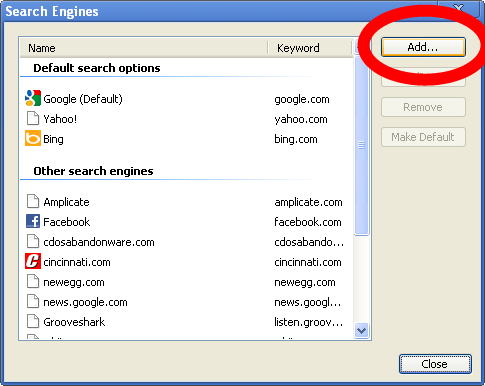
I know that speed is a big issue with a lot of people. After all, some of these counters are being used for speed studies to see if they want to put a cop on a road at a certain time. This does happen, despite my wishes that cops and others would use less-detectable methods for enforcement. There are two other ways that counts, with speed, can be taken. One is by RADAR (the same thing they use for active speed enforcement). Mind you, for speed sampling, RADAR is pretty useful when installed correctly, and the boxes can be hidden quite well. The other is using magnetic loops. There are portable models of these that sit in the lane and are difficult to see (and also susceptible to theft). There are also permanent models that can be completely hidden from view.
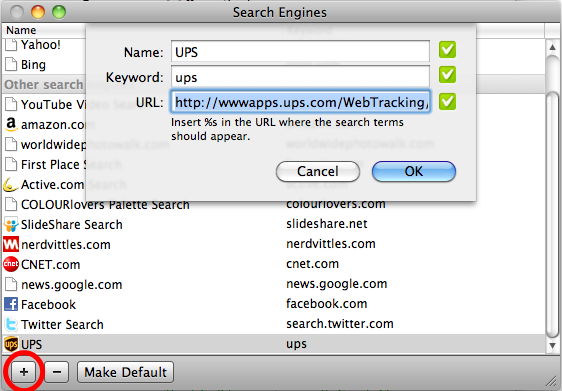
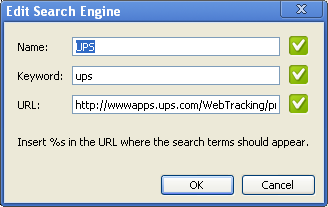
One thing I can say with ALL hose counters: WE CANNOT USE THEM FOR SPEED ENFORCEMENT! The units do not have any cameras (etc), so if you speed while going over them, we know you did, but we don't know who you are!

Second off: How We Use The Data We Get From These Things

This one differs by jurisdiction, but most use it for traffic studies. Speed, count, and vehicle type are very useful for roadway improvement design. Another use is for travel model validation. We (specifically me, since it is my job) use this to ensure that the region's travel model is accurate so when we use it to plan billions of dollars in improvements, we know we're not just guessing, which would be a waste of money.

Law enforcement will use the number of speeders per unit of time to plan when to run patrols. As I indicated, I wish they wouldn't use hose counters for this, but they do, and the data they get is accurate. However, hoses are pretty conspicuous, which is why I wish they wouldn't use them.

We cannot use the data in court. You cannot be detected to be going 45 MPH in a 25 MPH zone based on a traffic counter. The counters do not have cameras in them, and none that I know of can connect to a camera. A camera would be required to prove who was speeding. Without the connection, it would be difficult to prove, since the times would have to be the same, the counter has to be operating perfectly, and the hoses have to be measured very precisely. Some states also forbid the use of cameras for passive law enforcement (a cop can actively use a RADAR+camera, but not mount one on a pole and get every car that is speeding).

The War Stories

I have two, both given to me by a salesperson for Jamar Tech, one of the leading traffic counter manufacturers.

City of Boston Thinks a Counter is a Bomb. This one is proof that some cops don't use hose counters, else they would have known what this unit is.

Counter burned, likely by an accelerant. PDF from Jamar, which the salesperson sent me just after I bought 8 counters from him.

Don't Mess With Them!

It amazes me that 1 month into the season, I've had to replace several hoses because of cut or stolen hoses. This is your tax dollars at work. The more hoses we have to replace, the less money we have to improve the roads.

Travel Demand Modeling 101 Part 1: Terminology

August 22nd, 2008

It occurred to me that many people likely do not understand all of the terminology of travel demand models.  Because of this, I felt the need to list many of them here. Read the rest of this post... »

Random Thought: Road Nicknames

June 4th, 2008

I've occasionally seen some road nicknames that are particularly good.  A few that I've heard:

  • Malfunction Junction (I-275 and I-4, Tampa, FL)
  • The Riddle in the Middle (Alaska Way, Seattle, WA)
  • Spaghetti Junction (I-85 and I-285, Atlanta, GA)

I've also started calling a strech of Columbia Parkway (Cincinnati, OH) "The Suicide Side", which is a 45 MPH arterial that everyone goes 60 MPH.  The divider is a double-yellow line... only.

Got any more?  Add 'em in the comments.

Four Step Model Explained: Trip Generation

June 3rd, 2008

Trip generation is likely one of the easiest parts of the four step process.  Normally, the most difficult part of dealing with trip generation is getting the input socioeconomic (population and employment) data correct.  This post explains how trip generation is calculated in the model... Read the rest of this post... »

Introduction to the Four Step Travel Demand Model

May 27th, 2008

The center of most travel demand models is the "Four Step Model".  This model was created in the 1950s to determine the demand on roadways.  The four steps include:

  1. Trip Generation
  2. Trip Distribution
  3. Mode Choice
  4. Trip Assignment

Read the rest of this post... »