Reading a Matrix File in C++ and Doing Something With It
Last week’s post showed how to open a path file using C++. This week’s post will show how to open a Cube Voyager matrix file in C++.
Setup
Like last week, we need to reference VoyagerFileAccess.lib in the project. Â We also need to add the external references in the header file as below:
extern "C" __declspec(dllimport)void* MatReaderOpen(const char *filename, char *errMsg, int errBufLen);
extern "C" __declspec(dllimport)int MatReaderGetNumMats(void* state);
extern "C" __declspec(dllimport)int MatReaderGetNumZones(void* state);
extern "C" __declspec(dllimport)int MatReaderGetMatrixNames(void* state, char **names);
extern "C" __declspec(dllimport)int MatReaderGetRow(void* state, const int mat, const int row, double *buffer);
extern "C" __declspec(dllimport)void MatReaderClose(void* state);
Also ensure that the project is setup with the character set of “Not Set” as opposed to Unicode, which seems to be a default in MS Visual C++ Express Edition.
Main Application
The main application is fairly simple and just opens the matrix and outputs the number of tables and zones to the screen.
#include "stdafx.h"
#include <stdio.h>
#include <iostream.h>

using namespace std;

int _tmain(int argc, _TCHAR* argv[])
{
	char errMsg[256]="";
	// Open the matrix
	void* matrixState=MatReaderOpen(argv[1],errMsg,256);
	// Get number of tables in the matrix
	int nMats = MatReaderGetNumMats(matrixState);
	// Get number of zones in the matrix
	int nZones = MatReaderGetNumZones(matrixState);
	// Output to screen
	cout << "File " << argv[1] << endl;
	cout << "Number of Tables....." << nMats << endl;
	cout << "Number of Zones......" << nZones << endl;
	// Close the matrix
	MatReaderClose(matrixState);
	cout << "Matrix Closed." << endl;
	cout << "Press any key to close" << endl; 	char tmp; 	cin >> tmp;
	return 0;
}
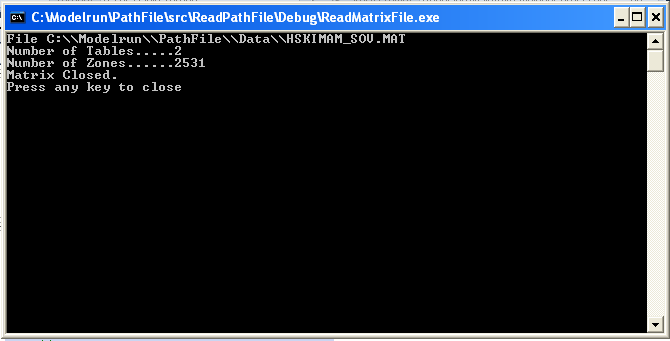
The output looks like the below:
Tags: c++, cube, voyager, voyager api






You must be logged in to post a comment.